Sources
Amazon Keyspaces
Learn how to configure Amazon Keyspaces as a source in Artie, including service account setup, cluster configuration, and enabling CDC streams on your tables.
Required settings
- Service endpoint and Port for your Region, for example
cassandra.us-east-1.amazonaws.comand9142 - AWS region
- An IAM user (access key) or a role Artie can assume, allowed to read the tables and their CDC streams
- The keyspace, with a CDC stream turned on for each table you want to sync
IAM policy
Artie reads each table and the system and system_schema tables with CQL, and reads changes with the Keyspaces Streams API. This example allows both for every table in the keyspace my_keyspace:
JSON
{
  "Version": "2012-10-17",
  "Statement": [
    {
      "Effect": "Allow",
      "Action": "cassandra:Select",
      "Resource": [
        "arn:aws:cassandra:us-east-1:123456789012:/keyspace/my_keyspace/table/*",
        "arn:aws:cassandra:us-east-1:123456789012:/keyspace/system*"
      ]
    },
    {
      "Effect": "Allow",
      "Action": [
        "cassandra:GetStream",
        "cassandra:GetShardIterator",
        "cassandra:GetRecords"
      ],
      "Resource": "arn:aws:cassandra:us-east-1:123456789012:/keyspace/my_keyspace/table/*/stream/*"
    },
    {
      "Effect": "Allow",
      "Action": "cassandra:ListStreams",
      "Resource": "*"
    }
  ]
}
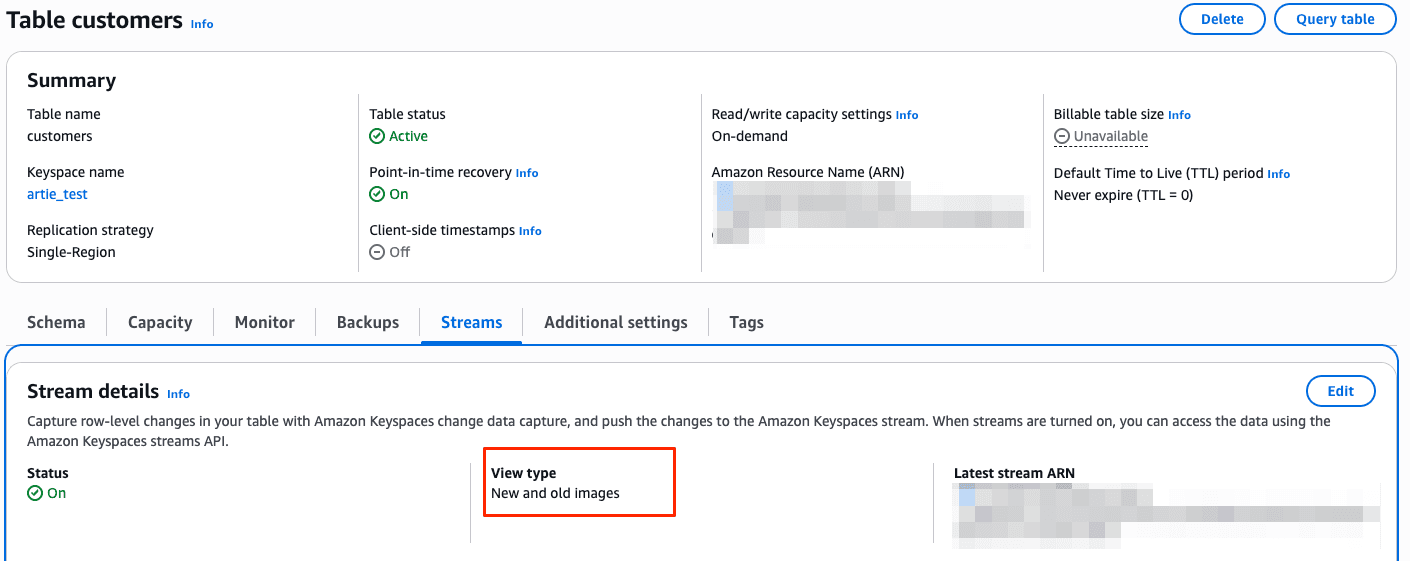
Enabling CDC stream
You will need to enable CDC stream for each of the table you would like Artie to sync.
To do this, navigate to the table and click on the “Streams” tab. Make sure the view type is set to either “NEW_AND_OLD_IMAGES” (preferred) or “NEW_IMAGE”.