Using Artie
Artie's typing library
How Artie picks a destination type for each column and when a new column reaches the destination. Covers numbers, JSON, arrays and timestamps.
Artie’s typing library is part of Artie Transfer, the service that writes to your destination. In its benchmarks it detects the type of an integer, boolean or float 1.7 to 1.9 times faster than Go’s reflect package.
When schema changes reach the destination
A new column reaches the destination once Artie knows its type. Where the type comes from depends on the source.
| Source | Where the type comes from | A column that holds only NULLs |
|---|---|---|
| Relational, for example PostgreSQL and MySQL | The source column’s type | Added with the next write, even when every value is NULL |
| Non-relational, for example DynamoDB and MongoDB | The first value that isn’t NULL | Added when the first value that isn’t NULL arrives |
For a non-relational source, Artie waits for a real value so that it never picks a type from incomplete data.
Artie adds every column that exists in the source and is missing from the destination, unless the table’s column inclusion or exclusion list leaves it out. For how tables are created and columns are dropped, see Schema evolution.
A new source table joins a running pipeline only when Auto-replicate new tables is on. Artie checks for new tables every weekday at 6 AM Pacific Time by default. See Automatically add new tables.
Data type handling
Artie settles each column’s type in this order:
- Initial type detection: For a new column, Artie uses the source schema. Without a source schema, it uses the first value that isn’t NULL.
- Type preservation: Once the column exists in the destination, the destination’s type is the source of truth.
- Data type conversion: When the source and destination types differ, Artie converts each value to the destination’s type.
To change a column’s type, create or alter the column in the destination. Artie keeps the destination’s type.
Failed conversions
When a value can’t be converted to the column’s type, the write fails with an error. In these cases, Artie writes a different value instead of failing:
| Case | What Artie writes |
|---|---|
| A string too long for its column on Redshift, Snowflake, Oracle, MySQL or Microsoft SQL Server | __artie_exceeded_value |
| A JSON object too large for its column on Redshift or Snowflake | {"key":"__artie_exceeded_value"} |
| A value that doesn’t fit, with Truncate exceeded values on | Redshift trims the string to fit. BigQuery trims a decimal to the column’s scale. |
| A spatial value Snowflake can’t convert | NULL in a new row. An update keeps the stored value. |
| An invalid value, with an option only Artie can turn on | NULL. On Snowflake this covers bad timestamps, numbers and booleans; on BigQuery, bad timestamps. |
MongoDB NaN, Infinity or -Infinity, or a date outside years 1 to 9999 | NULL |
| A DynamoDB number with more digits than a double holds | The number, rounded to a double |
Artie emails an alert for replication errors unless Disable alert emails is on for the pipeline. For help with a conversion error, email [email protected].
Numbers
For a relational source, the number type comes from the source column: integer, float, double, or decimal with its precision and scale.
For MongoDB, the type comes from the value:
5→ Integer"5"→ String5.0→ Float
Three source values are stored differently from how the source holds them:
| Source value | Stored as | Why |
|---|---|---|
MongoDB Decimal128 | String | Not every destination holds a Decimal128 without losing precision |
MongoDB NaN, Infinity and -Infinity | NULL | The value is not a finite number |
DynamoDB number (N) | Double | DynamoDB has one number type for integers and decimals |
A decimal that is wider than the destination’s decimal type is stored as a string. The limit for each destination is listed under Variable numeric.
JSON objects
Artie stores a JSON object as it appears in the source, with no flattening or transformation.
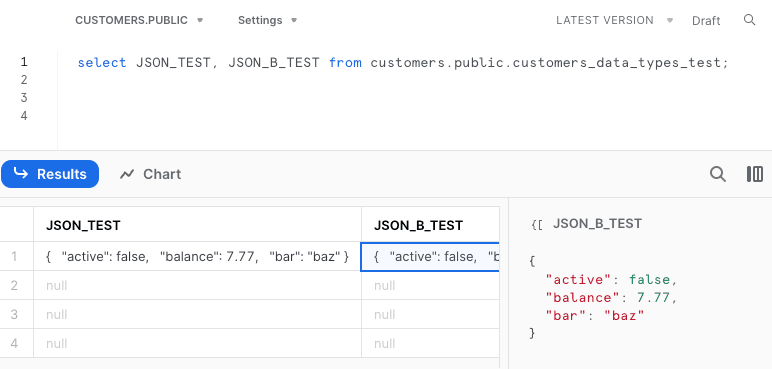
Without a source schema, a string that holds a valid JSON object or array is also typed as JSON.
Arrays
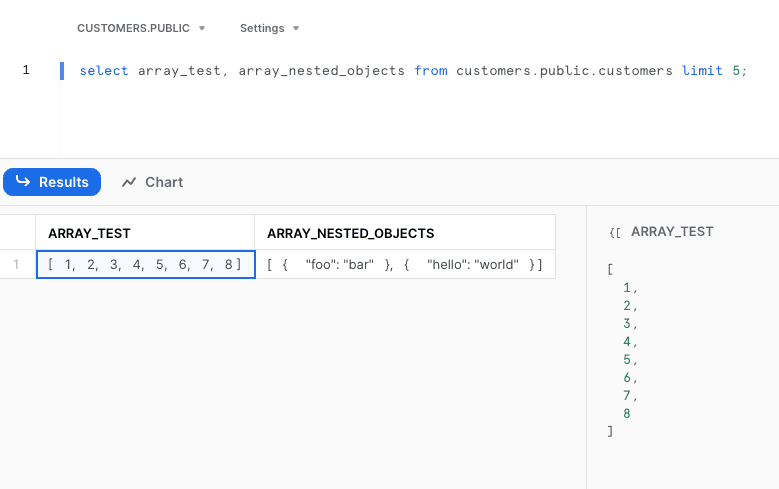
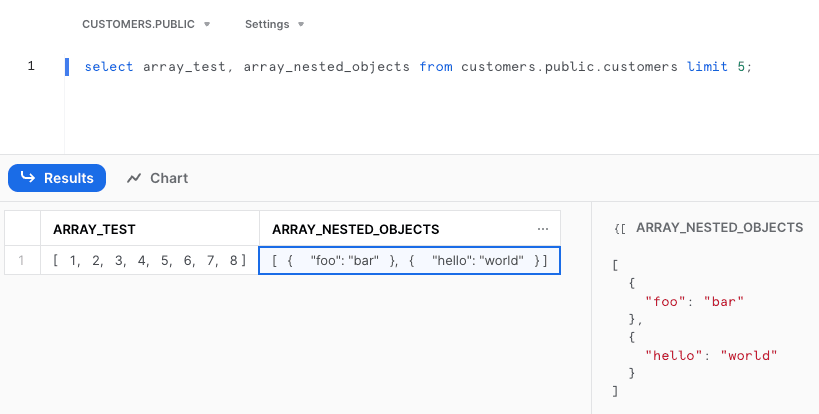
Artie stores both of these array shapes as arrays:
- Simple arrays
- Nested arrays with objects
A simple array in Snowflake:
An array with nested objects in Snowflake:
Timestamps, dates, and times
Artie parses a string into a date, time or timestamp when the source schema or the destination column has that type. It reads 22 string layouts:
| Type | Layouts | Example layouts |
|---|---|---|
| Timestamp, standard layouts | 17 | RFC 3339 with up to nanosecond precision, RFC 822, RFC 850, RFC 1123, ANSI C, Unix date, Ruby date |
| Timestamp with no time zone offset | 2 | 2006-01-02T15:04:05.999999999, 2006-01-02 15:04:05.999999999 |
| Date | 1 | 2006-01-02 |
| Time | 2 | 15:04:05.999999, 15:04:05.999999Z07:00 |
A layout matches only when formatting the parsed value returns the original string, so parsing never drops fractional seconds. Times of day use Artie’s own wrapper around Go’s time.Time and are written with microsecond precision.
A MongoDB date with a year before 1 or after 9999 is stored as NULL.
Variable numeric
A variable numeric column A variable numeric column is a numeric data type without precision or scale specified. in Postgres stores any number of digits in each value, up to the implementation limit Up to 131072 digits before the decimal point; up to 16383 digits after the decimal point. That exceeds the numeric type of most destinations, so those destinations get a string column to keep every digit.
Oracle, CockroachDB, Amazon Keyspaces and Snowflake sources send variable numeric columns too, such as an Oracle NUMBER declared without precision and scale, or a Snowflake DECFLOAT. The rules below apply to them the same way.
The column type Artie creates depends on the destination:
| Destination | Variable numeric column | Decimal with a fixed precision becomes a string when |
|---|---|---|
| Snowflake | STRING | Precision is above 38 |
| Databricks | STRING | Precision is above 38 |
| Redshift | TEXT | Precision is above 38 |
| Microsoft SQL Server | VARCHAR(MAX) | Precision is above 38 |
| Iceberg | STRING | Precision is above 38 |
| ClickHouse | STRING | Precision is above 76 |
| MotherDuck | TEXT, or DOUBLE with DOUBLE for variable numerics on | Precision is above 38 |
| BigQuery | NUMERIC, or BIGNUMERIC with BIGNUMERIC for variable numerics on | Precision or scale is outside the BIGNUMERIC range |
| PostgreSQL | NUMERIC | Never |
| Oracle | NUMBER | Precision is above 38 |
| MySQL | DECIMAL(65, 5) | Precision is above 65 or scale is above 30 |
The two settings appear for PostgreSQL, Oracle, CockroachDB, Amazon Keyspaces and Snowflake sources. In pipeline setup, they are under Advanced options on the destination step. On an existing pipeline, they are under Advanced settings on the destination tab. Their labels there are Use BIGNUMERIC for variable numeric columns and Use DOUBLE for variable numeric columns.
MySQL DECIMAL(65, 5), BigQuery NUMERIC and Oracle NUMBER have a fixed size, so a variable numeric value can hold more digits than the column:
- MySQL rounds the value to 5 decimal places.
- BigQuery
NUMERICholds 9 decimal places. Truncate exceeded values trims the rest, andBIGNUMERICholds 38. - Oracle
NUMBERholds 38 significant digits.
To use a different type, alter the destination column. Artie keeps the destination’s type.
Related
- Schema evolution: how Artie creates tables and adds or drops columns.
- MongoDB: typing for mixed-type fields, nested fields, and the Cast all columns to string setting.
Need help?
Email [email protected] with questions this page doesn’t cover.
Was this page helpful?
- Need help? Message us on Slack or email [email protected].
- Want a walkthrough? Book a demo.
- LLM? Read llms.txt.