Using Artie
Column inclusion and exclusion
Choose between a column inclusion list and a column exclusion list for a table, and decide whether to set it on the pipeline table or on a shared source reader.
Column inclusion and column exclusion are per-table settings. They differ in what Artie replicates and in how a column added to the source later is handled.
| Setting | What Artie replicates | Columns added to the source later |
|---|---|---|
| Column inclusion | Only the columns you list | Not replicated until you add them to the list |
| Column exclusion | Every column except the ones you list | Replicated |
Inclusion versus exclusion
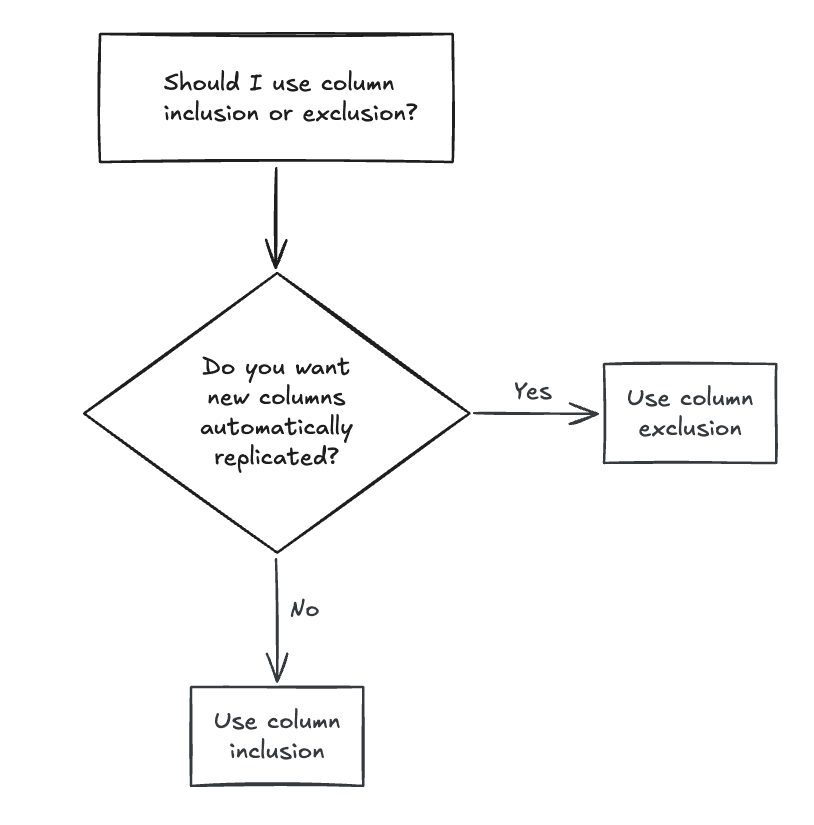
Use column exclusion when new source columns should replicate automatically. Use column inclusion when they should stay out until you add them.
Three rules apply to both settings:
- A table uses inclusion or exclusion, never both. Saving both fails with
cannot specify both include and exclude columns. - Primary key columns can’t be excluded, and the dashboard keeps them in an inclusion list.
- An inclusion list never removes Artie’s system columns (
__artie_*).
To set either one in the dashboard, see Exclude certain columns and Include certain columns.
One source, several destinations
A shared source reader can feed several pipelines, each with its own column settings. It’s set up in the Terraform provider; see Write to multiple destinations.
The shared source reader publishes each table’s changes once, and every attached pipeline consumes them:
Each pipeline has its own Kafka consumer group. Each pipeline table takes its own column inclusion or exclusion list, on top of the source reader’s.
Column lists on a shared source reader
A shared source reader adds a second place to set columns_to_include or columns_to_exclude:
| Where | Terraform attribute | Applies to |
|---|---|---|
| Shared source reader | tables on artie_source_reader | Every pipeline attached to the reader |
| Pipeline table | tables on artie_pipeline | That pipeline only |
A source reader that isn’t shared has no tables map, so set the list on the pipeline table.
Where columns are filtered
The pipeline table’s list always filters rows before Artie writes them to the destination. The source reader also filters change events before it publishes them to Kafka, and filters its backfill reads. It uses the shared source reader’s list, or the pipeline table’s list when the reader isn’t shared.
Some sources limit what the source reader filters:
| Source | What the source reader filters |
|---|---|
| MongoDB | Excluded fields from backfills. From change events only in collection-scoped mode. No inclusion list. |
| DocumentDB | Excluded fields from backfills only. No inclusion list. |
| DynamoDB and API | Nothing |
| Every other source | Both lists, in change events and backfills |
With these sources, columns the source reader doesn’t filter still reach Kafka. Set the list on each pipeline table to keep them out of the destination.
Choose where to set the list
For a shared source reader, pick the place from what each destination needs:
| Situation | Where to set the list |
|---|---|
| Every destination gets the same columns, and excluded values must stay out of Kafka | The source reader, for a source it filters fully |
| Every destination gets the same columns, with no requirement for Kafka | The source reader or the pipeline table |
| Destinations get different columns, using exclusion | On the source reader, exclude the columns that no destination gets. Exclude the rest on each pipeline table. |
| Destinations get different columns, using inclusion | On the source reader, include the union of the columns that any destination gets. Then include or exclude on each pipeline table. |
When the source reader and a pipeline table both use inclusion, the reader’s list must contain every column in the pipeline table’s list. Otherwise pipeline validation fails with an error like this one:
shared source reader should include column "email" for table "public.account"Validation checks no other combination. A column the source reader filters out never reaches the pipeline, even when the pipeline table includes it.
The flowchart shows the same decision:
Was this page helpful?
- Need help? Message us on Slack or email [email protected].
- Want a walkthrough? Book a demo.
- LLM? Read llms.txt.