Using Artie
Soft partitioning
Artie writes a Redshift or Snowflake table as monthly or daily partition tables under one view, so you keep querying one table name.
Soft partitioning is a logical partitioning strategy implemented at the ingestion layer rather than relying on native database partitioning features. Artie splits a table’s rows into time-based partition tables and exposes them through one view with the table’s usual name, so you query the view as before.
Supported destinations
Soft partitioning works with Redshift and Snowflake destinations.
It doesn’t combine with these features:
Why soft partitioning
Some databases support native partitioning. Others have limits that make it ineffective for ingestion workloads:
| Database | Native feature | Limit for ingestion |
|---|---|---|
| PostgreSQL | Native partitioning | None. It suits both ingestion and query workloads. |
| BigQuery | Partitioning and clustering on a timestamp or date column | Frequent small batches create many partitions and raise costs. |
| Snowflake | Cluster keys that co-locate related rows in micro-partitions | Re-clustering is asynchronous and consumes credits outside a warehouse. Query pruning is less predictable. |
| Redshift | Distribution keys for data placement and sort keys for pruning | Built for joins and analytical queries, not high-throughput ingestion. |
Soft partitioning isn’t available for BigQuery, so use native partitioning there. See the BigQuery Partitioning guide.
Partition tables and the unified view
The examples in this section use a user_events table with these columns:
CREATE TABLE user_events (
  uuid UUID NOT NULL,
  event_name VARCHAR(255) NOT NULL,
  user_id BIGINT NOT NULL,
  created_at TIMESTAMP NOT NULL,
  properties JSONB,
  PRIMARY KEY (uuid, created_at)
);
Artie manages four kinds of object for user_events:
| Object | Type | What it holds |
|---|---|---|
user_events_2025_08 | Table | Rows whose partition column falls in that month. Daily partitions are named like user_events_2025_08_22. |
user_events_default | Table | Rows from compacted partitions, and rows from a past period that has no partition table. |
user_events_null | Table | Rows with no partition value, because the column is NULL or missing. |
user_events | View | Every row, as a UNION ALL of the tables in this list. |
Partition tables
The partition scheme is by month or day, keyed off one date or time column, here created_at. Artie creates a table for each partition period. With monthly partitions:
user_events_2025_08
user_events_2025_09
user_events_2025_10
A recurring job creates the partition table for the current period and the next 2 periods. The next run adds them to the unified view.
Row routing
Artie writes each row to the partition table that matches its created_at timestamp.
Three cases don’t land in a dated partition table:
- A
NULLor missing partition value goes touser_events_null. - A value in a past period with no partition table goes to
user_events_default. - A value in a later month than the change happened fails with
partition time for column "created_at" is in the future of execution time.
For daily partitions, the future check fails values 24 hours or more ahead of the change.
Unified view
Artie maintains a view named user_events that unions all partitions, and updates its definition as partitions are created and compacted. artie_full_partition_name holds each partition table’s fully qualified name:
CREATE OR REPLACE VIEW user_events AS (
  SELECT
    uuid,
    event_name,
    user_id,
    created_at,
    properties,
    'db.schema.user_events_default' AS artie_full_partition_name
  FROM db.schema.user_events_default
  UNION ALL
  SELECT
    uuid,
    event_name,
    user_id,
    created_at,
    properties,
    'db.schema.user_events_null' AS artie_full_partition_name
  FROM db.schema.user_events_null
  UNION ALL
  SELECT
    uuid,
    event_name,
    user_id,
    created_at,
    properties,
    'db.schema.user_events_2025_08' AS artie_full_partition_name
  FROM db.schema.user_events_2025_08
  UNION ALL
  SELECT
    uuid,
    event_name,
    user_id,
    created_at,
    properties,
    'db.schema.user_events_2025_09' AS artie_full_partition_name
  FROM db.schema.user_events_2025_09
  UNION ALL
  SELECT
    uuid,
    event_name,
    user_id,
    created_at,
    properties,
    'db.schema.user_events_2025_10' AS artie_full_partition_name
  FROM db.schema.user_events_2025_10
);
Compaction
As the number of partitions grows, Artie compacts old partitions by merging their rows into the _default table. Max partitions sets how many partition tables Artie keeps, up to and including the current one. The 2 pre-created future tables are kept on top of that, so a Max partitions of 1 leaves 3 dated tables. Artie drops a compacted partition table once it is empty.
Compaction needs the source table’s primary key. A primary key on the destination, or a primary key override, doesn’t count. If a source table without one has partitions to compact, the job stops for that table before it merges any rows. It then creates no new partition tables either.
Enable soft partitioning
If the table already exists in the destination, contact us and we’ll help you migrate it to be soft partitioned. On Redshift, deploy validation fails if the destination already has a table with the view’s name, here user_events. Rename the existing table or contact us for a one-time migration.
On Snowflake, deploy doesn’t check for an existing table. The recurring job then fails on every run for that table, so contact us before you turn soft partitioning on for a table that already exists.
The pipeline needs a source and a destination, and the table must be selected for replication.
Open the Tables tab
In the pipeline, open the Tables tab.
Open the table's advanced settings
In the table’s row, select Advanced settings (the gear icon).
Turn on soft partitioning
Under Performance, check Enable soft partitioning.
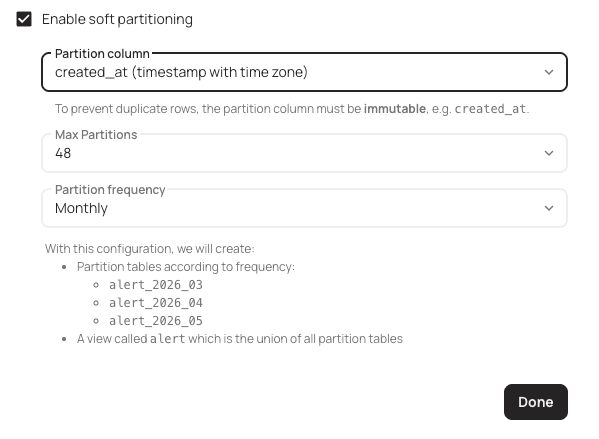
Set the partition column, count and frequency
Set Partition column, Max partitions and Partition frequency, described in Soft partitioning settings.
The form lists the current and next 2 partition tables and the view that Artie creates.
Save the pipeline
Select Save. Artie saves the pipeline.
Deploy the pipeline
Select Deploy.
After you deploy, a recurring job manages the view and the partition tables. The job only processes tables that are streaming.
These steps use the Advanced settings dialog on the Edit pipeline page. New-pipeline setup labels the same settings Split into time partitions, Partition column, Frequency and Partitions to keep.
Soft partitioning settings
The settings appear in this order after you check Enable soft partitioning:
| Setting | Default | Allowed values | Description |
|---|---|---|---|
| Partition column | None | A date or time column | The column Artie partitions by. To prevent duplicate rows, it must be immutable, for example created_at. |
| Max partitions | 48 for monthly, 30 for daily | Keep all, or 1 to 48 for monthly and 1 to 30 for daily | How many partition tables to keep before Artie merges older partitions. Keep all never merges them. |
| Partition frequency | Monthly | Monthly, Daily | The period each partition table covers. |
With Terraform, set these values in the soft_partitioning block of a table in the artie_pipeline resource. Terraform accepts max_partitions from 1 to 30. It can’t set Keep all or a monthly value above 30, such as the monthly default of 48.
Managed objects and dependencies
The recurring job takes these actions:
- Creates new partition tables, then recreates the unified view to include them.
- Compacts old partition tables, then recreates the unified view to exclude them.
- Adds new columns to all managed tables, then recreates the unified view to include them.
Artie emails a summary titled Soft Partitioning Changes when the job creates the _default table, creates, merges or drops partition tables, or adds columns. Each entry lists the queries the job ran.
Redshift
Consider using late-binding views instead of standard views.
To check for dependent objects, run this query in Redshift:
  SELECT
    dependent_ns.nspname as dependent_schema,
    dependent_view.relname as dependent_view,
    source_ns.nspname as source_schema,
    source_table.relname as source_table,
    pg_attribute.attname as column_name
  FROM
    pg_depend JOIN pg_rewrite ON pg_depend.objid = pg_rewrite.oid
    JOIN pg_class as dependent_view ON pg_rewrite.ev_class = dependent_view.oid
    JOIN pg_class as source_table ON pg_depend.refobjid = source_table.oid
    JOIN pg_attribute ON pg_depend.refobjid = pg_attribute.attrelid AND pg_depend.refobjsubid = pg_attribute.attnum
    JOIN pg_namespace dependent_ns ON dependent_ns.oid = dependent_view.relnamespace
    JOIN pg_namespace source_ns ON source_ns.oid = source_table.relnamespace
  WHERE
    source_ns.nspname = '<SCHEMA_TO_CHECK>' AND
    source_table.relname = '<TABLE_TO_CHECK>'
  ORDER BY 1,2;
Replace <SCHEMA_TO_CHECK> and <TABLE_TO_CHECK> with the schema and table to check.
Snowflake
See Snowflake’s queries to check for dependent objects.
Good fits
Soft partitioning works for any dataset with a timestamp column and a primary key. It is most effective for the two cases in this section.
Time-series, append-only data
- Event streaming
- IoT sensor data
- Transaction logs
- Application metrics
High-volume ingestion
- Where the cost of updating large tables is high
- Merge workloads that often target recent slices of data
- Scenarios requiring predictable ingestion performance
Benefits
- Faster ingestion: smaller, time-based partitions enable quicker writes, and queries target specific time ranges.
- Reduced lock contention: operations on different partitions occur independently, which minimizes blocking.
- Explicit partition control: you choose the partition column, the frequency and how many partitions to keep.
- Simpler data management: data is separated by time period, and Artie compacts old partitions for you.
- Lower compute costs: queries scan only the relevant partitions.
- Predictable scaling and costs: ingestion and query performance stay consistent as data volume grows.
- Freedom from native partitioning constraints: the partitioning happens in Artie, not in the database.
Was this page helpful?
- Need help? Message us on Slack or email [email protected].
- Want a walkthrough? Book a demo.
- LLM? Read llms.txt.