Destinations
ClickHouse
Configure ClickHouse Cloud as a destination in Artie with required settings including warehouse address, service account credentials, and setup instructions.
Required settings
After creating a warehouse in ClickHouse Cloud, you will need to provide the following:
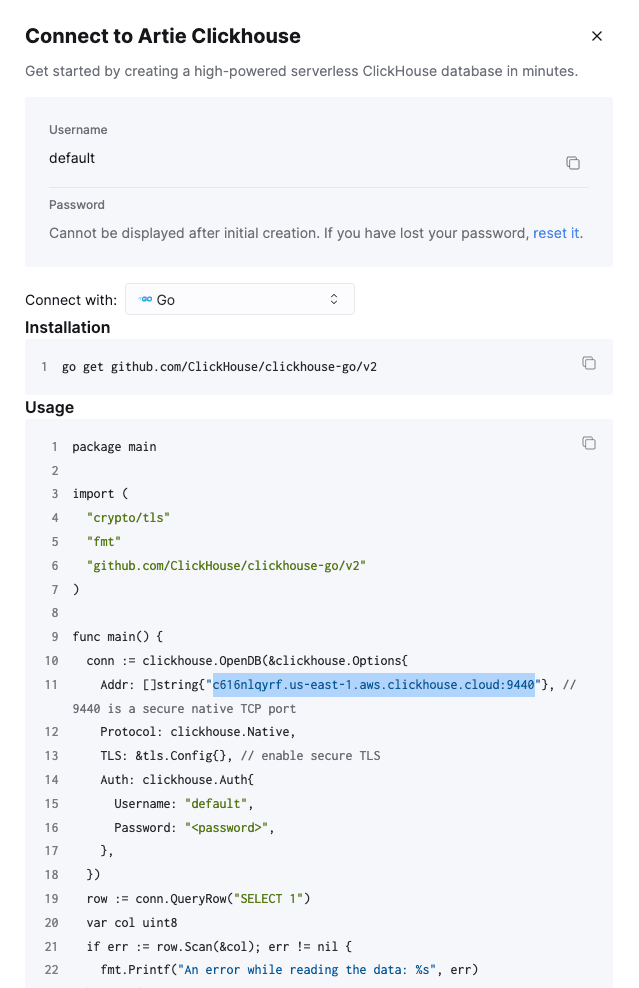
- Address: in ClickHouse Cloud, choose Go under Connect with, then copy the address shown in the image below
- Service account username
- Service account password
Creating a service account
SQL
CREATE USER artie IDENTIFIED BY '<password>';

-- Replace <database> with your desired destination database.
GRANT CREATE TABLE,
      ALTER ADD COLUMN,
      ALTER MODIFY COLUMN,
      ALTER DROP COLUMN,
      INSERT,
      DROP TABLE
ON <database>.* TO artie;
If you wish to allow Artie to create the destination database, grant that permission separately:
SQL
GRANT CREATE DATABASE ON *.* TO artie;If your ClickHouse server has table_engines_require_grant=1, grant the table engines Artie uses:
SQL
GRANT TABLE ENGINE ON MergeTree TO artie;
GRANT TABLE ENGINE ON ReplacingMergeTree TO artie;
If your ClickHouse server has access_control_improvements.select_from_system_db_requires_grant=1, also grant the metadata reads Artie uses:
SQL
-- If access_control_improvements.select_from_system_db_requires_grant=1,
-- also grant the ClickHouse metadata reads used by Artie:
GRANT SELECT ON system.databases TO artie;
GRANT SELECT ON system.tables TO artie;
GRANT SELECT ON system.columns TO artie;
Retrieving the warehouse address