Skip to content

Changelog

Product updates, connector releases, and reliability improvements from Artie.

FILTER UPDATES

    1. PRODUCT

      Multi-Data Plane Support

      Host pipelines across multiple data planes, whether on Artie's cloud or your own BYOC infrastructure.

      Read more: Multi-Data Plane Support

      Artie now supports hosting pipelines across multiple data planes, whether you're on our cloud or using your own (BYOC) infrastructure.

      For example, run one pipeline from Postgres to Snowflake in AWS US-East-1 and another from MySQL to Snowflake in AWS US-West-2.

      Architecture docs
    2. CONNECTORS

      S3 Iceberg destination (Beta)

      S3 Iceberg is available in beta as a destination, replicating directly into Apache Iceberg tables backed by AWS S3 Tables.

      Read more: S3 Iceberg destination (Beta)

      S3 Iceberg is now available in beta! This new destination uses AWS's recently released S3 Tables support, allowing you to replicate directly into Apache Iceberg tables backed by S3. It's a big unlock for teams building modern lakehouse architectures on open standards.

      S3 Tables destination docs
    3. CONNECTORS

      Self-Serve DynamoDB Backfills

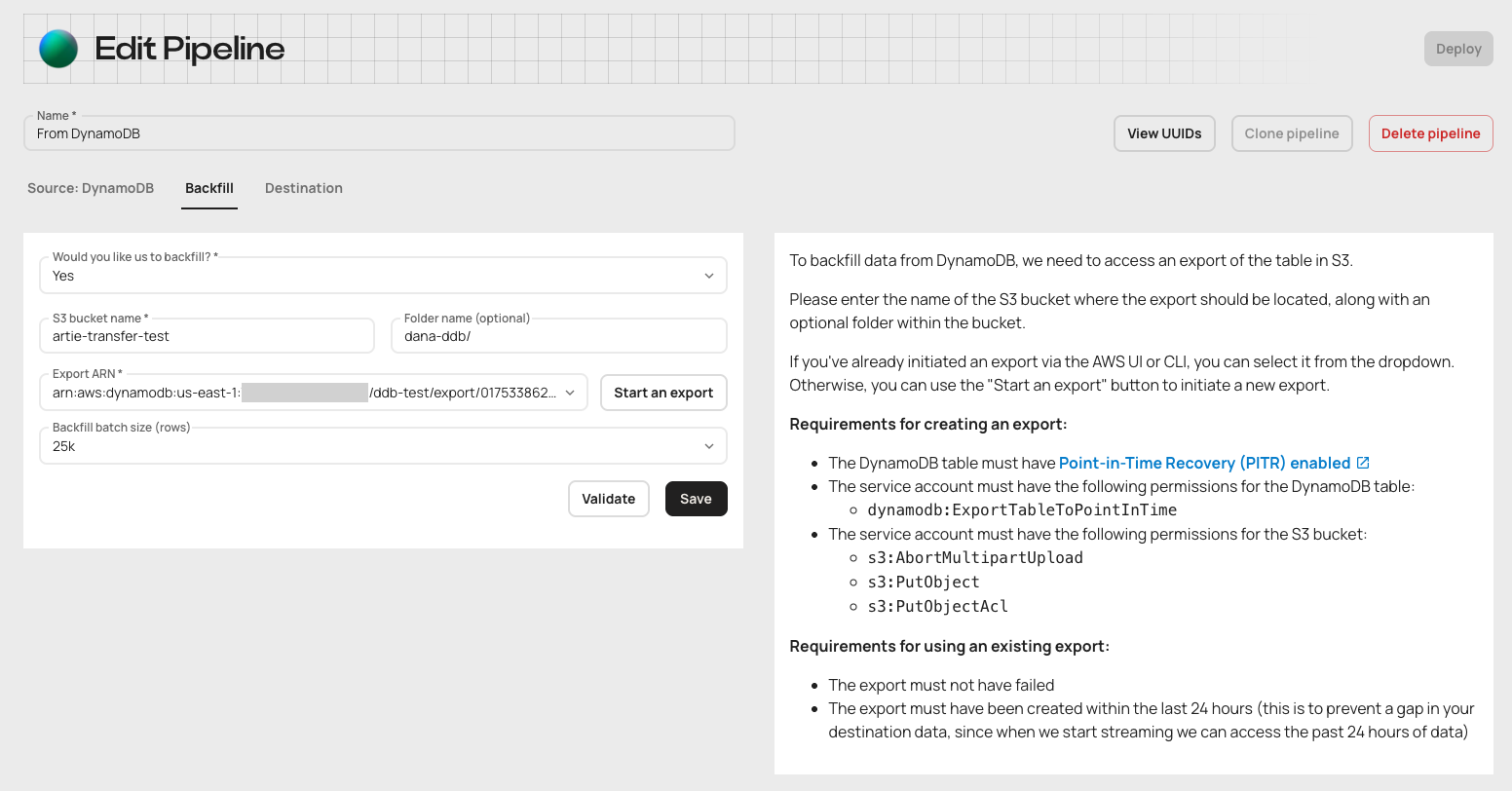
      A guided flow in the DynamoDB pipeline setup lets you start a table export from your AWS account or select an existing export, with errors shown immediately.

      Read more: Self-Serve DynamoDB Backfills

      Backfills are a critical step in onboarding new pipelines - especially when you're working with historical data in DynamoDB. Until now, Artie handled that part for you, kicking off a table export behind the scenes. That worked fine - unless something broke. If your AWS role didn't have the right permissions or something else went sideways, users were left guessing.

      Now, that guesswork is gone.

      When setting up a DynamoDB pipeline, you’ll now see a guided flow in the UI that helps you kick off a backfill. You can export the table directly from your AWS account - or select an existing export if you’ve already started one manually.

      Self-Serve DynamoDB Backfills

      No more opaque failures. If something’s wrong (like missing permissions), you’ll see it immediately and can fix it yourself - without waiting or wondering.

      Why this matters:

      • DynamoDB backfills are now fully transparent and user-controlled
      • Errors (like missing permissions) are surfaced immediately for faster fixes
      • Reuse recent exports - no need to start from scratch
      • Smoother, more reliable onboarding for new DynamoDB pipelines

      Setting up a new DynamoDB pipeline? You'll see the new backfill flow automatically. Questions? Reach out - we're here to help.

      DynamoDB source docs
    1. PRODUCT

      Column Control: Include, Exclude, Hash

      Column-level controls let you include, exclude, or hash individual columns to decide what gets replicated to the destination.

      Read more: Column Control: Include, Exclude, Hash

      Not every column needs to make it to your warehouse.

      Some fields are sensitive. Some are noisy. Some just don’t belong anywhere near analytics.
      Now, you can decide exactly what gets replicated - and what doesn’t - with Artie’s expanded column-level controls.

      Here’s what’s now possible, per column:
      ✅ Inclusion - define an allowlist. Only replicate what you explicitly approve; otherwise, ignore
      🚫 Exclusion - let most of the table through, but block the columns you don’t want downstream
      🔐 Hashing - keep the structure, mask the value. Track fields like user IDs, without exposing data
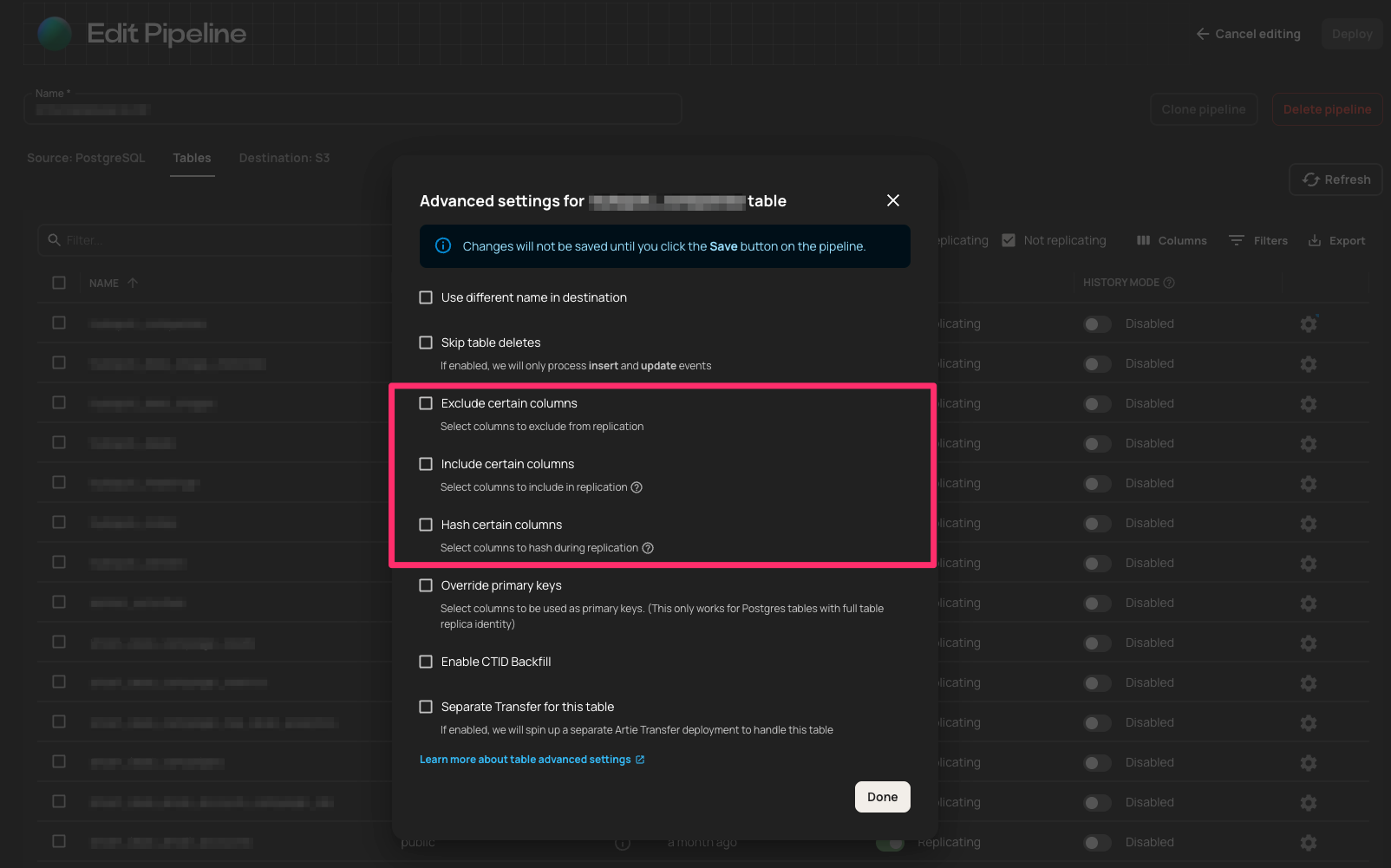
      Column Control: Include, Exclude, Hash

      Why this matters:

      This isn’t just a cleanup job. It’s control over what leaves prod.

      Inclusion

      Sometimes, it’s not about removing sensitive fields - it’s about only sending the ones you trust. Inclusion rules flip the default: instead of replicating everything and hoping exclusions or hashes catch the risky stuff, you define exactly what gets through - and block the rest.

      What this means:

      • Safer by default - no surprises when new columns show up
      • Compliance-friendly - ideal for PII and financial data
      • Cleaner data - only the fields analytics and ML teams actually need

      Exclusion

      Most of the table is fine. But those one or two fields? No thanks. 
      Exclusion rules let you drop what doesn’t belong - without touching your schema.

      Use it when:

      • You’re skipping internal metadata, debug fields, or legacy junk
      • You want to trim without breaking things
      • You’re migrating slowly and need a guardrail, not a wall

      Hashing

      Some fields need to be trackable - but not readable. 
      Hashing keeps them in your pipeline without exposing what’s inside.

      Reach for hashing when:

      • You want to track user behavior across systems without exposing identity
      • You’re debugging and need to confirm values match across systems - without logging sensitive data
      • You’re sharing a warehouse and want to prevent exposing raw PII to teams that don’t need it
      • You only need to know whether or not a value has changed

      Want to configure it?
      Column-level rules are set at the source. This guide explains where they belong and why.
      Column configuration docs
    2. PRODUCT

      Column Inclusion Rules

      Define an explicit allowlist of columns to replicate so only the fields you specify reach the destination.

      Read more: Column Inclusion Rules

      You can now define an explicit allowlist of columns to replicate - ideal for PII or other sensitive data. This expands our column-level controls alongside column exclusion and hashing. Only the fields you specify get replicated. Everything else stays out.

      Column inclusion docs
    3. PERFORMANCE

      Parallel Segmented Backfills for Postgres

      Parallel Segmented Backfills split Postgres tables into row segments by integer primary key and backfill them in parallel as an alternative to CTID scans.

      Read more: Parallel Segmented Backfills for Postgres

      CTID-based backfills are fast and efficient - especially for large, append-only Postgres tables. They scan directly by physical row location, often outperforming logical queries in stable datasets.

      But CTIDs come with tradeoffs: they’re slow to initialize for large tables, fragile in dynamic tables where rows update or move, and they can time out in environments with aggressive statement_timeout settings.

      For teams working with massive, constantly changing Postgres tables, these limitations can stall backfill progress or create reliability risks.

      Parallel Segmented Backfills offer an alternative path. Instead of relying on CTID, Artie slices tables into logical row segments based on integer primary keys - then parallelizes the work across those chunks.

      The result: similar performance to CTID backfills, but with stronger guarantees in dynamic environments.

      We recently helped a customer backfill 8 billion rows in an actively updated Postgres table. CTID-based scans kept timing out and drifting. With Parallel Segmented Backfill, we split the workload across logical row ranges and completed the job - no timeouts, no skipped rows, no guesswork.

      Why this matters:

      • Resilient to updates and vacuuming - row movement doesn’t break backfills
      • Offers CTID-level performance with better reliability under load
      • Avoids statement_timeout failures in large or busy tables
      • Makes backfill behavior predictable and tunable
      Backfill optimization docs
    4. PRODUCT

      Read Once and Write to Multiple Destinations

      Sync data from a single database to multiple destinations from the same connector, avoiding duplicate reads on the source.

      Read more: Read Once and Write to Multiple Destinations

      You can now sync data from a single database to multiple destinations - all from the same connector.

      Why this matters:

      • Reduce load on production databases by avoiding duplicate reads and minimizing replication slot overhead
      • Ability to fan out to multiple tools - e.g., write to both Snowflake and Redshift
      • Ability to support diverse use cases in parallel - analytics, ML, real-time alerting

      This feature is designed for organizations that:

      • Operate across multiple data platforms 
      • Serve many internal teams with different tools
      • Need to scale data infrastructure without increasing operational burden

      If you're planning a multi-destination architecture, we'd be happy to help - just reach out.

      Multiple destinations guide
    5. PRODUCT

      Read Once, Write Many

      Read from a source database once and write to multiple destinations, removing the need for multiple replication slots.

      Read more: Read Once, Write Many

      We recently launched the ability to read-once and write to multiple destinations. This means you no longer need multiple replication slots on your source database.

      For example, by reading data just once from your Postgres instance and simultaneously replicating it to Snowflake and Redshift, you reduce database overhead and simplify replication architecture.‍

      Multiple destinations guide
    6. PRODUCT

      Autopilot for New Tables

      Autopilot finds new tables in your source database and syncs them automatically once auto-replicate new tables is turned on.

      Read more: Autopilot for New Tables

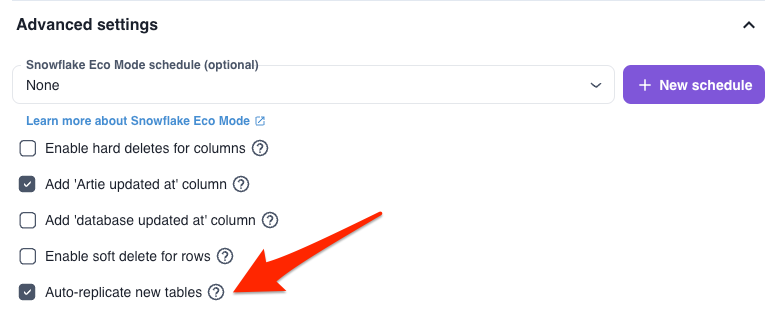
      Stop manually hunting for new tables in your source DB. Autopilot finds and syncs them for you - zero config required. Turn it on via:

      Deployment → Destination Settings → Advanced Settings → “Auto-replicate new tables”

      Autopilot for New Tables

      Autopilot docs
    7. CONNECTORS

      External Stage Support for Snowflake

      Delta files can be written to a Snowflake external stage, such as your own S3 bucket, and read from there when changes are applied to the target table.

      Read more: External Stage Support for Snowflake

      Some teams need more control over where their data goes - and how it gets there. Maybe it’s for compliance. Maybe audit. Or maybe they just don’t want Snowflake touching their data until the very last step.

      By default, Artie loads delta files into Snowflake using internal staging before merging them into the target table. That worked fine for most workflows - but some teams need an extra layer of control over how data flows through their environment.

      You can configure Artie to write delta files to a Snowflake external stage - like your own S3 bucket - and we'll read from there when applying changes to your target table.

      This gives organizations - like federal agencies using Snowflake Gov Cloud - the ability to use an external stage in their own environment, keeping data fully under their control for things like internal review, validation, or security scanning before deciding to merge into Snowflake.

      Same fully managed sync. Just with the files landing in your environment first.

      Why this matters

      ✅ You keep full visibility into what’s being staged before it’s merged
      ✅ You can retain delta files for auditing or reprocessing - entirely on your terms
      ✅ You get tighter control over when data crosses trust boundaries

      There’s no impact on performance. No extra cost. Just more flexibility, when you need it.

      Want to turn this on? Let us know - we'll help you get set up.

Watch your data replicate live