Skip to content

Changelog

Product updates, connector releases, and reliability improvements from Artie.

FILTER UPDATES

    1. PRODUCT

      Full Source Table Name Support

      Add the full source table name as a column, and optionally to the primary key, so sharded tables can fan into one destination table without key collisions.

      Read more: Full Source Table Name Support

      When data is sharded across multiple upstream tables, primary keys are often only unique within each table-not across all of them. Until now, that meant fanning data into a single destination table wasn't possible without risking collisions.

      You can now include the complete source table name ({{database}}.{{schema}}.{{table}}) as a column in your replication stream. This provides additional metadata about where each row originated. You can also choose to make this new column part of the primary key - giving you a surrogate key that ensures uniqueness across shards.

      Why this matters:

      • Replicate sharded datasets into a single destination table without key conflicts
      • Preserve visibility into the exact origin of each record
      • Eliminate the need for complex workarounds or manual deduplication
      • Unlock new fan-in use cases for teams consolidating data from many sources
      Source metadata columns docs
    2. PRODUCT

      Pending Status for Pipelines

      Pipeline actions show a pending state in the dashboard while changes are deployed to the data plane.

      Read more: Pending Status for Pipelines

      Sometimes, when you make a change to a pipeline, it can take a few minutes before everything is deployed to our data plane. Until now, the UI didn't give you much feedback - leaving some customers wondering if their update had gone through.

      Pipeline actions are now displayed with a pending state while they're being applied. Instead of guessing whether your deployment worked, you'll see right away when a pipeline is in progress - and when it's fully live.

      Why this matters:

      • Removes confusion when pipeline changes take 2–5 minutes to deploy
      • Provides clear visibility into the status of your updates
      • Helps teams trust what they're seeing in the dashboard
      • Reduces unnecessary support questions like "I clicked update, but nothing happened"
    1. PRODUCT

      Consolidated Pipeline Change Notifications

      Schema changes and pipeline issues across many pipelines are rolled up into a single alert email that lists the affected pipelines.

      Read more: Consolidated Pipeline Change Notifications

      Managing dozens of pipelines shouldn't mean managing dozens of alerts. Until now, schema changes or pipeline issues like credential rotations triggered one email per pipeline. That worked fine when you had just a handful of pipelines, but for teams running 30, 50, or even 80+ pipelines, inboxes quickly got overloaded.

      Instead of sending a separate email for each pipeline event, Artie now rolls them up into a single alert. You'll still see exactly which pipelines are affected - whether it's a schema change, a connection timeout, or a credential update - but without the avalanche of duplicate emails.

      Why this matters:

      • Cut down on alert fatigue - fewer emails, clearer signal
      • Immediate visibility into which pipelines are affected, all in one place
      • Scales with your environment, whether you manage 3 pipelines or 80
      • Keeps alerts actionable - you know what happened, where, and when
      Notifications docs
    2. PRODUCT

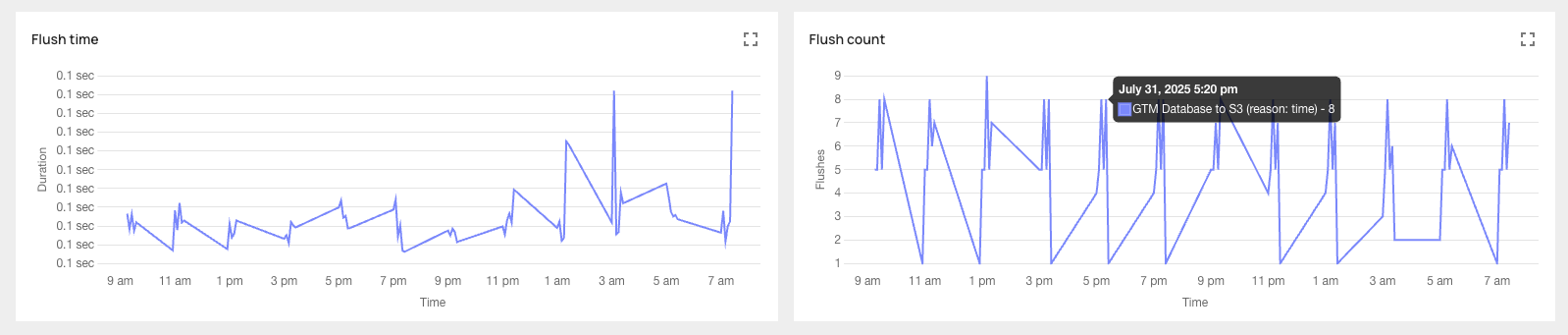
      Flush Metrics Now Available in Analytics

      Flush Metrics in the Analytics dashboard show how often data flushes, which flush rule triggered it, and how long it took.

      Read more: Flush Metrics Now Available in Analytics

      For teams replicating high-volume data into destinations like Snowflake, BigQuery, or Postgres, setting the right flush rules is key to balancing freshness, cost, and performance. But without visibility, tuning those rules can feel like guesswork.

      Flush rules let you control when data gets written from Artie's streaming buffer to your destination - based on time intervals, row counts, or byte thresholds. With Flush Metrics, you now get a clear view into how those rules are performing.

      Take a healthtech team syncing MySQL to BigQuery: they've configured a 60-second or 1MB flush rule. Now, they can see exactly how often data flushes, what triggered it, and how long it took - helping them optimize for cost and latency without guessing.

      Flush Metrics Now Available in Analytics

      Why this matters:

      • Tune pipelines with data - not guesswork
      • Validate whether your flush rules are hitting SLAs
      • Optimize for warehouse costs by spotting over-frequent writes
      • Troubleshoot delays and fine-tune performance in seconds

      Head to the Analytics dashboard or read the docs for how to get started. Need help tuning? We're here.

      Flush rules tuning docs
    3. CONNECTORS

      New Destination: Postgres

      Postgres is available as a destination, with changes streamed from source databases and schema changes and backfills handled automatically.

      Read more: New Destination: Postgres

      Not every use case belongs in a warehouse. Teams often need to move transactional data into Postgres to power real-time APIs, partner-facing systems, or operational dashboards - without the complexity of Snowflake or the fragility of DIY CDC scripts.

      Until now, Artie's destinations focused on analytics platforms. But operational systems matter too - and we're making sure you're covered.

      You can now stream changes from your source databases directly into Postgres - just like any other Artie pipeline. It's fully managed, fault-tolerant, and handles schema changes and backfills automatically.

      Some teams are already using it to power internal tools by syncing MySQL to Postgres - skipping the warehouse entirely. Others are using Postgres-to-Postgres replication to isolate production workloads or build live replicas for disaster recovery.

      Same reliability. New destination.

      Why this matters:

      • Power real-time APIs and dashboards without a warehouse
      • Eliminate fragile CDC scripts with a fully managed solution
      • Sync across Postgres instances to isolate workloads or support disaster recovery
      • Handle schema changes and backfills automatically - no maintenance required

      Curious if Postgres fits your use case? Check the docs or reach out - we'll help you get started.

      PostgreSQL destination docs
    4. PRODUCT

      Unifying Tables Across Schemas

      A fan-in option merges tables with the same name across schemas or shards into a single destination table, with schema evolution handled automatically.

      Read more: Unifying Tables Across Schemas

      For teams managing sharded or micro-sharded databases, downstream complexity multiplies fast. Each shard or schema produces its own copy of every table. That means instead of M tables, you end up with N × M tables in your warehouse (where N = number of shards/schemas, M = number of tables). Analysts are stuck stitching them back together, engineers write endless union queries, and operations teams lose the clean, consolidated view they need.

      You can now unify tables across schemas directly in replication. Instead of landing one table per schema, Artie automatically merges them into a single, consolidated destination table.

      Take an e-commerce platform sharding customers across 50+ schemas: instead of 50 separate users tables, you now get one unified users table downstream. Or a payments company splitting transactions across micro-shards: all those rows flow neatly into one transactions table in Snowflake. With Artie's fan-in option, the number of downstream tables is simplified back to M, and schema evolution is handled automatically.

      Why this matters:

      • Simplified data model: query one table instead of wrangling dozens, with schema evolution managed for you.
      • No duplication: eliminate manual unions or stitching scripts in the warehouse.
      • Consistent structure: unified naming across shards improves data quality and usability.
      • Effortless scaling: add new shards upstream, and they automatically merge downstream.

      Unifying tables docs
    1. PRODUCT

      Source Metadata Columns

      Enable source metadata columns in Advanced Settings to append transaction ID, log sequence number, schema, table, and database name to replicated tables.

      Read more: Source Metadata Columns

      When you're consolidating data from multiple sources, it's not always enough to just move the rows - you also need to know where they came from. Without that context, compliance checks get harder, debugging slows down, and downstream apps lose critical signals. Artie makes it simple to retain that lineage.

      You can now enable source metadata columns in Advanced Settings. When turned on, Artie appends an extra column to replicated tables containing details like transaction ID, log sequence number, schema, table, and database name.

      For example:

      • A fintech consolidating dozens of sharded MySQL databases into one Snowflake table can track exactly which shard each row came from.
      • A healthcare company can capture source database and table information for HIPAA audit logs.
      • A payments team can tie replicated rows back to original transaction IDs for fraud analysis.

      Why this matters:

      • Traceability: See exactly where each row originated, even across shards.
      • Auditability: Support compliance and security workflows with source-side context.
      • Debugging: Isolate discrepancies quickly by filtering on schema/table metadata.
      • Flexibility: Build custom fraud detection, routing, or monitoring logic using metadata.
      Source metadata columns docs
    2. CONNECTORS

      Specifying Snowflake Roles

      Specify which Snowflake role to use when authenticating with a service account, so one account can serve several environments.

      Read more: Specifying Snowflake Roles

      Some Snowflake service accounts are like Swiss Army knives - they have multiple roles, each with its own permissions and environment. Until now, Artie simply authenticated with the service account's default role. That worked for straightforward setups, but for teams running multiple environments (like staging, pre-prod, and prod) from a single service account, it meant juggling credentials or sticking to a one-size-fits-all role.

      You can now tell Artie exactly which Snowflake role to use when authenticating with a service account.

      Example: If your company runs staging, pre-prod, and prod in Artie, you can use a single service account for all of them - just assign a different role per environment. This keeps credentials simple while ensuring each environment only has access to what it needs.

      Why this matters:

      • Simplifies credential management - no more creating and rotating multiple service accounts for different environments
      • Keeps environments isolated - staging stays staging, prod stays prod, even with the same account
      • Supports better security practices - roles can be scoped to the exact permissions needed
      • Reduces operational overhead - fewer accounts to configure, monitor, and maintain
      Snowflake destination docs
    3. RELIABILITY

      Improved DDL Support for Cell-Based Architectures

      A new opt-in job checks and syncs table schemas across environments, adding new columns even when a database has no row changes.

      Read more: Improved DDL Support for Cell-Based Architectures

      In environments with multiple isolated databases - like production, staging, and dev - schema drift is a persistent risk. Columns added in one cell might not appear in another unless there’s active data flowing through. That means teams looking at the “same” table in Snowflake could be seeing different structures, leading to confusion, bugs, and broken dashboards.

      This became especially painful for teams whose QA and Dev environments receive little to no traffic. With our previous behavior, tables wouldn’t update unless a row changed - leaving environments out of sync.

      Artie now supports schema alignment across environments.

      We’ve introduced a new opt-in job that automatically checks and syncs table schemas across environments - even when there are no row changes. If a new column shows up in production, it’ll get added to dev and staging too, so all environments stay aligned.

      This feature ensures you get consistent schemas, no matter how much (or little) traffic a database gets.

      Why this matters

      • Guarantees column consistency across environments (prod, staging, dev)
      • Eliminates silent schema drift in low-traffic databases
      • Supports cell-based and single-tenant architectures out of the box
      • Reduces debugging time and improves trust in test environments
      Schema evolution docs
    4. CONNECTORS

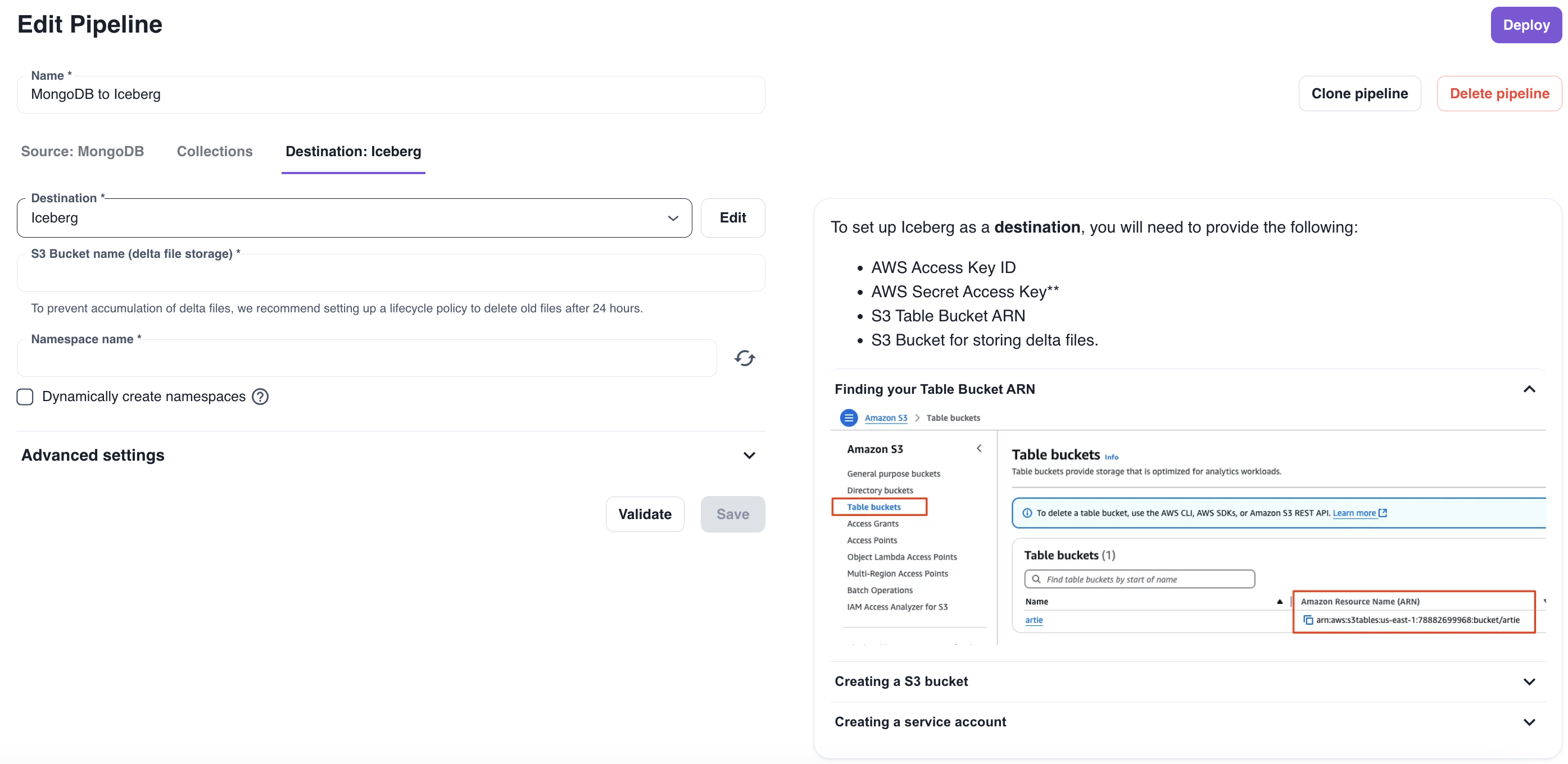
      Iceberg Support Using S3 Tables

      Stream data into Apache Iceberg tables on S3 using S3 Tables, with a managed catalog, compaction, and snapshot management.

      Read more: Iceberg Support Using S3 Tables

      This launch adds something big: support for Apache Iceberg using S3 Tables.

      Artie customers can now:

      • Stream high-volume datasets into Iceberg-backed tables stored on S3
      • Use S3 Tables’ fully managed catalog, compaction, and snapshot management
      • Query efficiently with Spark SQL (via EMR + Apache Livy) without wrestling with cluster glue
      • Get up to 3x faster query performance thanks to automatic background compaction

      Iceberg Support Using S3 Tables

      Why is Iceberg a big deal? Because it solves what’s frustrating and limiting about traditional S3-based data lakes. Hive tables are rigid and brittle, with no snapshotting or time travel. Delta Lake is powerful but tied to the Databricks ecosystem. Plain S3 file storage? No metadata layer, no transactions, no query optimizations.

      Instead, Iceberg gives you a fully open, cloud-native table format with smooth schema evolution, hidden partitions, snapshot isolation, and time-travel queries, all with broad engine support (Spark, Trino, Flink, Presto, Hive).

      We’re excited about this because it means Artie customers can confidently move massive data volumes without needing to hand-build the plumbing: Iceberg and S3 Tables handle schema changes, partitioning, compaction, and snapshot management behind the scenes, so the system scales cleanly without brittle, custom workflows.

      📚 Want to set up Iceberg-backed pipelines? Docs to get started: https://artie.com/docs/destinations/iceberg/s3tables

      S3 Tables destination docs

Watch your data replicate live