Skip to contentManaged Kafka is live: Apache Kafka on AWS for half the cost of MSK

Changelog

Product updates, connector releases, and reliability improvements from Artie.

FILTER UPDATES

    1. CONNECTORS

      External Stage Support for Snowflake

      Delta files can be written to a Snowflake external stage, such as your own S3 bucket, and read from there when changes are applied to the target table.

      Read more: External Stage Support for Snowflake

      Some teams need more control over where their data goes - and how it gets there. Maybe it’s for compliance. Maybe audit. Or maybe they just don’t want Snowflake touching their data until the very last step.

      By default, Artie loads delta files into Snowflake using internal staging before merging them into the target table. That worked fine for most workflows - but some teams need an extra layer of control over how data flows through their environment.

      You can configure Artie to write delta files to a Snowflake external stage - like your own S3 bucket - and we'll read from there when applying changes to your target table.

      This gives organizations - like federal agencies using Snowflake Gov Cloud - the ability to use an external stage in their own environment, keeping data fully under their control for things like internal review, validation, or security scanning before deciding to merge into Snowflake.

      Same fully managed sync. Just with the files landing in your environment first.

      Why this matters

      ✅ You keep full visibility into what’s being staged before it’s merged
      ✅ You can retain delta files for auditing or reprocessing - entirely on your terms
      ✅ You get tighter control over when data crosses trust boundaries

      There’s no impact on performance. No extra cost. Just more flexibility, when you need it.

      Want to turn this on? Let us know - we'll help you get set up.
    2. RELIABILITY

      Data Quality: Rows Affected Checks

      A new guardrail verifies the number of rows affected by each database operation, such as inserted, updated, or deleted rows in merges.

      Read more: Data Quality: Rows Affected Checks

      To further enhance the data integrity built into our pipeline, we've added another guardrail: verifying the number of rows affected during each database operation.

      For example, during merge steps (such as in Snowflake), we confirm ROWS_LOADED from copy commands and validate the totals for inserted, updated, or deleted rows. This approach reinforces the robustness of our data replication process and it's another way we catch issues early and ensure replication integrity.

    1. PERFORMANCE

      Backfill Tuning: Picking the Right Batch Size

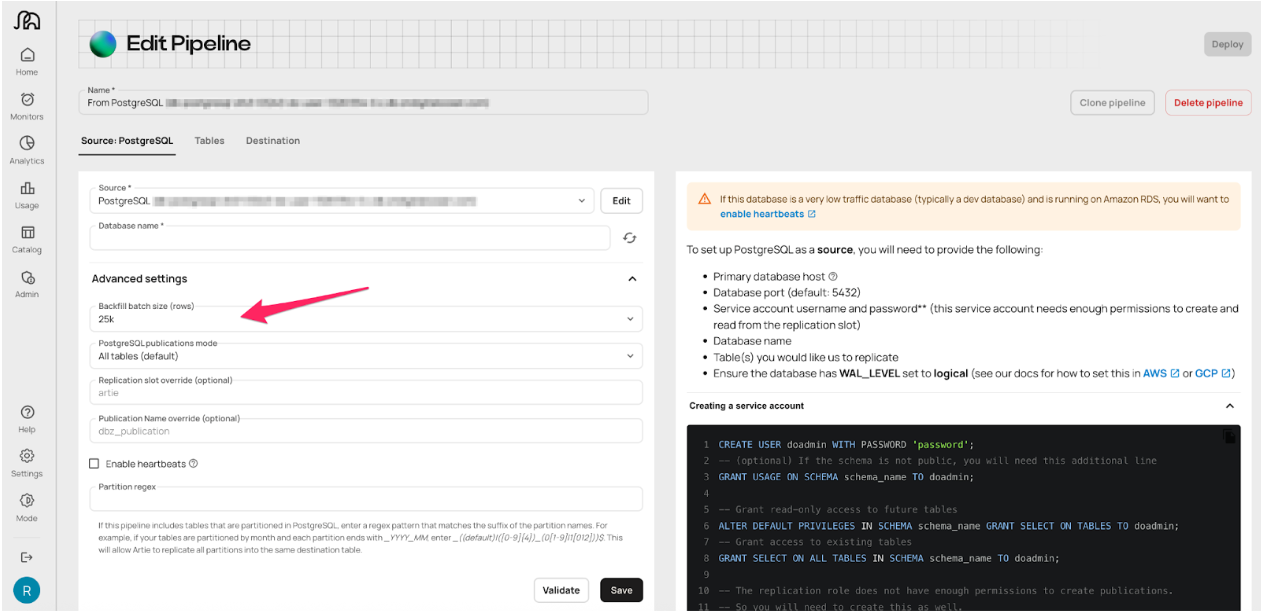
      Backfill batch size is now configurable, and the default rises from 5,000 to 25,000 rows per chunk.

      Read more: Backfill Tuning: Picking the Right Batch Size

      You can now control how many rows Artie processes at a time during backfills. The default is now 25,000 rows per chunk (up from 5,000), but you can tune this based on performance vs. load tradeoffs.

      Why backfill batch size matters:

      Backfills aren’t one-size-fits-all. Some teams want speed. Others are sensitive to database load and tiptoeing around a production DB at 2am. Until now, everyone got the same batch size of 5,000 rows per chunk. Now you can tune backfills to match your style:

      • The default is 25,000 rows - we benchmarked a bunch of sizes. 25,000 rows won out. So that’s our new default
      • You have control - adjust the batch size to fit your environment

      How to tune batch size based on your workload:

      Backfill Tuning: Picking the Right Batch Size

      • Speed up backfills: Larger chunks = fewer queries, can improve throughput, but overly large chunks can backfire. It’s about finding balance.
      • Reduce DB load: Smaller chunks = faster queries, lower impact on source

      Need help tuning batch size?

      If you're unsure what batch size is right for your workload, reach out - we'll help you tune it.

      Backfill docs
    2. PRODUCT

      CDC for Tables Without Primary Keys

      Replicate tables that lack a primary key by overriding it with a unique index, including composite indexes, with index column order preserved.

      Read more: CDC for Tables Without Primary Keys

      Some tables are weird. No primary key (PK), maybe just a unique index or some composite hack someone added in 2017. Until now, those were off-limits for replication.

      You can now override PK requirements by specifying a unique index - including composite indexes. Artie will respect the exact column order to ensure optimal performance.

      Why index-based PK overrides matter:

      Not every table has a clean PK. Some use unique indexes or composite keys that aren’t formally declared as PKs. Until now, these tables were difficult (or impossible) to replicate. This change addresses one of the most common blockers for CDC at scale.

      What’s changed:

      • PK override: Define row identity with a unique index
      • Use composite keys - even if unofficial or unenforced
      • Preserve the exact index column order, which affects how changes are captured and impacts query performance during replication (e.g., email, account_id, created_at)

      This unlocks flexible replication for legacy systems, denormalized tables, and high-volume sources - without compromising performance.

      When to use index-based keys:

      • Your table lacks a formal PK, but has a unique constraint or index
      • You rely on composite keys to identify rows
      • You’re dealing with legacy systems or data models that weren’t built with CDC in mind

      How to enable key overrides:

      Reach out to enable key overrides - we'll help define your index logic and validate it during setup.

      Primary key override docs
    1. CONNECTORS

      Oracle Fan-in

      Oracle Fan-in replicates data from thousands of Oracle sources while reducing Kafka topic sprawl and infrastructure costs.

      Read more: Oracle Fan-in

      With our Oracle Fan-in feature, you can now easily replicate data from thousands of Oracle sources - without painful manual setups or infrastructure overload. Fan-in reduces your Kafka topic sprawl, lowers infrastructure costs, and simplifies real-world, complex data replication.

Watch your data replicate live