Snowflake Schema Evolution: Managing Schema Changes in Production

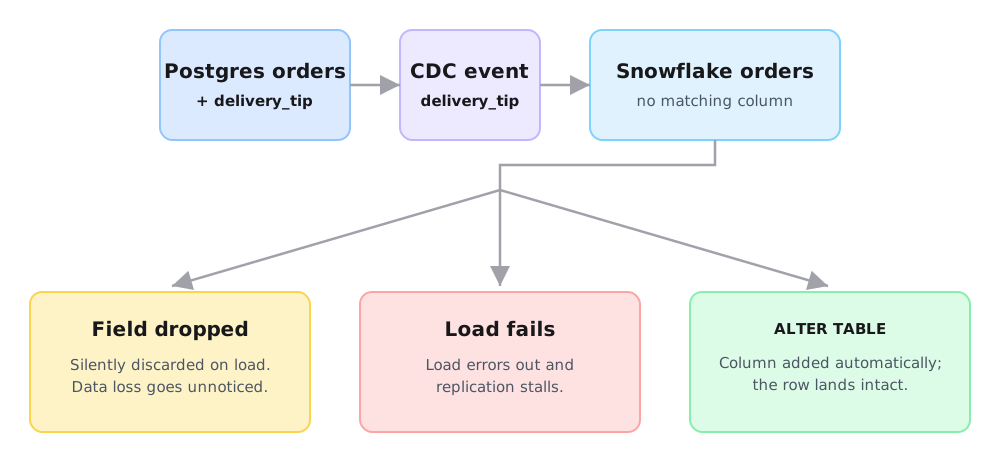
A backend engineer on your food delivery app adds one column to the orders table in Postgres: delivery_tip, a NUMERIC field for a new tipping feature. They ship it on a Tuesday afternoon. Nobody tells the data team.
By Wednesday morning, the dashboard that tracks revenue per order is missing tip data, silently dropping rows, or has stopped updating. Which one happens depends on how your pipeline handles a schema change it never saw coming.
Schema changes are a common source of pipeline failures and silent data-quality issues. This post covers how Snowflake handles schema changes on its own, where native support ends in real-time CDC architectures, and how to keep a Postgres-to-Snowflake pipeline running when the source schema shifts.
Key Takeaways
- Snowflake's native schema evolution adds new columns and relaxes
NOT NULLconstraints automatically. It won't rename a column, change an existing column's type, or drop a column - on any supported native schema-evolution ingestion path. - That feature now covers
COPY INTO, file-based Snowpipe, and Snowpipe Streaming. It still doesn't trigger onINSERTorMERGE- a common statement for CDC pipelines that apply updates and deletes directly. - Postgres's standard
pgoutputreplication protocol doesn't send a dedicated "schema changed" event. It sends refreshed table metadata that later rows get interpreted against, and the pipeline has to notice when that no longer matches what it saw last. - A managed pipeline that catches that change and applies the matching DDL to Snowflake removes most of this maintenance.
What Is Schema Evolution in Snowflake?
Schema evolution is how a table adapts when the shape of incoming data changes: a new column appears, a type widens, a field goes away. In an operational database like Postgres, you handle this with a migration you write, review, and deploy. In a warehouse, the table is on the receiving end of data it doesn't control, so the same idea gets harder.
Snowflake makes it harder still because of how it stores data. It's a strongly typed, columnar store: every column has a fixed data type, and data is stored and compressed per column. That's what makes queries fast, and it's also why the table is unforgiving about surprises. If an incoming field has no matching column, or a value's type doesn't fit one, what happens next depends on the ingestion path and error-handling configuration: Snowflake might reject the write, ignore the field, or - if schema evolution is configured for that path - just add the column and move on. There's no schemaless catch-all unless you deliberately built one with a VARIANT column.
So when delivery_tip shows up in the stream feeding your Snowflake orders table, either the table already has a matching column or something has to add it first. That "something" is what snowflake schema evolution is about.
How Snowflake Handles Schema Changes Natively
Snowflake ships a built-in schema evolution feature you turn on per table with the ENABLE_SCHEMA_EVOLUTION parameter, set at CREATE TABLE or with ALTER TABLE. With it on, a load can change the table's columns instead of erroring out.
It does two things automatically:
- Adds new columns. If a load contains a column the table doesn't have, Snowflake adds it.
- Relaxes
NOT NULL. If a column markedNOT NULLis missing from the incoming data, Snowflake drops the constraint so the load doesn't fail.
Where it applies has broadened: COPY INTO and file-based Snowpipe first, then the Kafka connector on Snowpipe Streaming, and now Snowpipe Streaming's high-performance architecture natively supports it too. The role running the load needs EVOLVE SCHEMA or OWNERSHIP, and a single COPY can add up to 100 new columns by default.
-- Turn on schema evolution for an existing table
ALTER TABLE orders SET ENABLE_SCHEMA_EVOLUTION = TRUE;
-- New columns in the load now get added automatically,
-- as long as the COPY matches columns by name
COPY INTO orders
FROM @orders_stage
MATCH_BY_COLUMN_NAME = CASE_INSENSITIVE
FILE_FORMAT = (TYPE = PARQUET);
The ceiling hasn't changed. On any of these paths, it's additive only: no renames, no type changes on existing columns, no drops. The high-performance architecture adds its own fine print - no widening precision, scale, or length, and no evolution for structured types like OBJECT or ARRAY (new columns of that shape land as VARIANT).
More importantly for a CDC pipeline: none of this triggers on INSERT or MERGE. A pipeline that lands changes with MERGE - the standard way to apply inserts, updates, and deletes from an OLTP source - isn't evolving with it, no matter how many ingestion paths Snowflake adds. If you're still deciding how data lands in Snowflake, we compared the two loading paths in Snowpipe vs. Snowpipe Streaming. The full reference is in Snowflake's schema evolution docs.
Schema Evolution in Real-Time CDC Pipelines: The Hard Part
Change data capture (CDC) reads your database's transaction log: the write-ahead log (WAL) in Postgres, where every insert, update, and delete is recorded. Instead of exporting files on a schedule, the pipeline replays those events into Snowflake continuously. That's what makes real-time data sync possible. If you're setting this up on Postgres, we walked through it in capturing CDC without breaking production.
Here's the mismatch, and it isn't really about files versus streams. Postgres's standard pgoutput protocol doesn't emit DDL statements or a dedicated "schema changed" event. Instead, it sends a Relation message with a table's current columns and types, and later row events get interpreted against it. A pipeline finds out about delivery_tip by noticing that a new Relation message no longer matches the one it had before, not by reading an "ALTER TABLE" anywhere in the stream.
A CDC pipeline that applies changes directly with MERGE - the common pattern for handling updates and deletes, not just inserts - doesn't get help from Snowflake's native schema evolution, since MERGE isn't one of the statements it triggers on. A different architecture can land raw, insert-only events through Snowpipe Streaming and merge them downstream in a second step. That landing table can lean on native evolution before the merge happens - but it's a different data model, not a fix for a pipeline that merges directly. Either way, for the direct-MERGE case, the pipeline has to notice the new Relation message, work out delivery_tip's type, and issue the ALTER TABLE in Snowflake itself, before the next MERGE tries to write a row that has it.
When that doesn't happen, snowflake data replication fails in one of three ways:
- The new column gets dropped on the floor. The Relation message shows
delivery_tip, the Snowflake table has no such column, and a pipeline that isn't watching for the change just ignores the field. Rows keep loading, tips never arrive, and the gap is invisible until someone asks why tip revenue reads zero. - The load hard-fails and blocks. A stricter pipeline rejects the write outright. That stalls replication downstream, and if the block reaches back far enough to stop the WAL reader from advancing too, your Postgres replication slot starts to grow.
- A type change breaks the merge. Someone changes a column's type, and the next
MERGEeither throws a conversion error and stalls, or - if the destination column happens to be permissive - silently accepts a value that doesn't really fit.
Artie is a fully managed real-time data replication platform that continuously streams row-level changes from databases like Postgres, MySQL, and MongoDB into warehouses like Snowflake and BigQuery.
This is the case we built for. Artie reads the Postgres WAL directly. When it receives refreshed relation metadata, it reloads the source table metadata, then compares the incoming columns with the destination and applies supported destination DDL before merging the affected batch. Supported additive changes apply automatically, no manual DDL or restart needed. Dropped columns are left in place unless you opt in to remove them, since dropping is the one change you can't easily undo.
If destination DDL or a destination write fails, Artie retries a failed flush and does not commit the affected consumer offset while the flush remains unsuccessful. Treat incompatible source type changes as breaking changes unless their destination-specific behavior has been validated.
Schema Evolution Best Practices for Snowflake Pipelines
These apply to any warehouse, but they matter most on a high-churn Postgres to Snowflake replication pipeline where the source schema moves often.
- Treat schema changes as pipeline events, not database events. The migration that adds
delivery_tipisn't done when it merges to Postgres. It's done when Snowflake has the column and rows are landing in it. Review schema changes in the same lane as the pipeline config. - Prefer additive changes; avoid renames and type narrowing. Adding a column is cheap and every layer handles it. A rename becomes three downstream operations (add, backfill, drop), and narrowing a type can reject live data. Add and deprecate instead of rename and retype.
- Decide your drop-column policy on purpose. Dropping a column in Snowflake to match the source is irreversible and can break every view and dbt model built on it. Default to keeping dropped columns and cleaning up deliberately.
- Watch replication lag and backlog as your early warning. A schema change the pipeline can't handle shows up as rising consumer lag or backlog - and, if the stall reaches the WAL reader, a growing replication slot - before it shows up as a wrong number on a dashboard. Alert on it and you catch drift while it's cheap to fix.
- Know your source's quirks before they reach Snowflake. Postgres can emit an unchanged-TOAST marker instead of the full value when a large field hasn't changed on an update, and a CDC system that misreads that marker as NULL can quietly corrupt data it never touched.
Best Practices Checklist
ENABLE_SCHEMA_EVOLUTIONset on tables loaded viaCOPY INTO, Snowpipe, or supported Snowpipe Streaming paths (not relevant forMERGE-based pipelines)- Schema changes reviewed alongside pipeline config, not just merged to Postgres
- Additive changes preferred; renames and type narrowing avoided
- Drop-column policy chosen (keep in destination vs. hard delete)
- Replication lag and replication slot growth monitored, with alerting
- Source-specific quirks (e.g., Postgres TOAST columns) accounted for
If you'd rather not hand-roll DDL detection and ALTER TABLE logic for every table, that's what Artie does out of the box: it detects schema changes in the stream and applies them to Snowflake as they happen. You can start for free or book a demo.
FAQ
What is schema evolution in the context of data pipelines?
Schema evolution is how a pipeline and its destination adapt when the source data's structure changes: a new column, a widened type, a dropped field. In practice it means detecting the change and applying a supported change to the warehouse, so downstream tables keep loading instead of breaking when upstream engineers ship a migration.
Does Snowflake automatically handle schema changes from source databases?
Not by watching the source database. Snowflake's schema evolution can kick in during COPY INTO, Snowpipe, and Snowpipe Streaming ingestion, but a CDC pipeline that applies changes directly with MERGE does not invoke that ingest-time feature. Recognizing a Postgres schema change and evolving the destination ahead of the write is the replication pipeline's job, not the warehouse's.
What happens to a CDC pipeline when the source schema changes?
It depends on the pipeline. Postgres's pgoutput protocol sends a Relation message with the table's current columns, and later row events get interpreted against it - a consumer has to refresh its own metadata when that definition changes. A pipeline that catches this evolves the destination and keeps going. One that doesn't might reject the batch, drop an unmapped field, or just pile up backlog. Whether the Postgres replication slot itself grows depends on where the pipeline gets stuck, not simply on a destination write failing.
How does Artie handle schema evolution for Snowflake replication?
Artie reads the Postgres WAL directly. When it receives refreshed relation metadata, it reloads source table metadata, then compares the incoming columns with the destination and applies supported destination DDL before merging the affected batch. Supported additive changes do not require a manual destination migration or a pipeline restart. Dropped source columns are retained by default; removal is opt-in and protected by a confirmation window. For incompatible type changes, validate the destination-specific behavior before deployment rather than assuming automatic conversion.
What is the difference between schema evolution and schema migration?
A schema migration is a deliberate, authored change to a database's structure: the ALTER TABLE an engineer writes and deploys. Schema evolution is how downstream systems react to that change as data flows. Migration is the cause on the source; evolution is the response in the pipeline and the warehouse.