PostgreSQL to Snowflake Replication

Why Replicate PostgreSQL to Snowflake?
Postgres is where your application data lives. Snowflake is where your data team wants to query it. The problem is getting data from one to the other without it going stale. Batch jobs and nightly syncs mean your analysts are always looking at yesterday's numbers. CDC keeps Snowflake in sync with Postgres continuously - no full-table scans, no cron schedules.
Say you're running an e-commerce platform on Postgres. Orders, inventory, and customer activity all live in your transactional database. Your data team wants real-time dashboards in Snowflake - but the nightly batch job means the inventory count they're looking at is always 8 hours stale. A support rep checks a customer's order status and sees yesterday's data. CDC closes that gap to under a minute.
AI and AI agent pipelines. If you're building a RAG application that answers questions about customer accounts, the retrieval layer needs current data. When a customer updates their billing address at 2pm and asks the AI agent about it at 2:05pm, the response should reflect the change - not yesterday's snapshot. CDC keeps the data feeding your embeddings and context stores in sync with production.
ML feature stores. Models trained on stale data drift. If your fraud model is scoring transactions against features that are 6 hours old, it's going to miss patterns that developed in the last hour. Artie streams user events and transactions into Snowflake so your data scientists can query feature tables that update in real time.
Compliance and audit trails. History mode preserves every insert, update, and delete. When an auditor asks "what did this customer's record look like at 2pm on March 12th?", history mode gives you the answer. That matters for SOX compliance, GDPR subject access requests, or just figuring out how a data discrepancy happened internally. Soft deletes support undoing mistakes without losing history.
How Artie Streams PostgreSQL to Snowflake
Here's what happens under the hood: Artie taps into the Postgres WAL using logical replication. Every committed change - inserts, updates, deletes - gets decoded into events that flow through Artie's pipeline. For 1:1 tables, data lands in Snowflake via MERGE. For append-only tables like history mode, we use Snowpipe Streaming
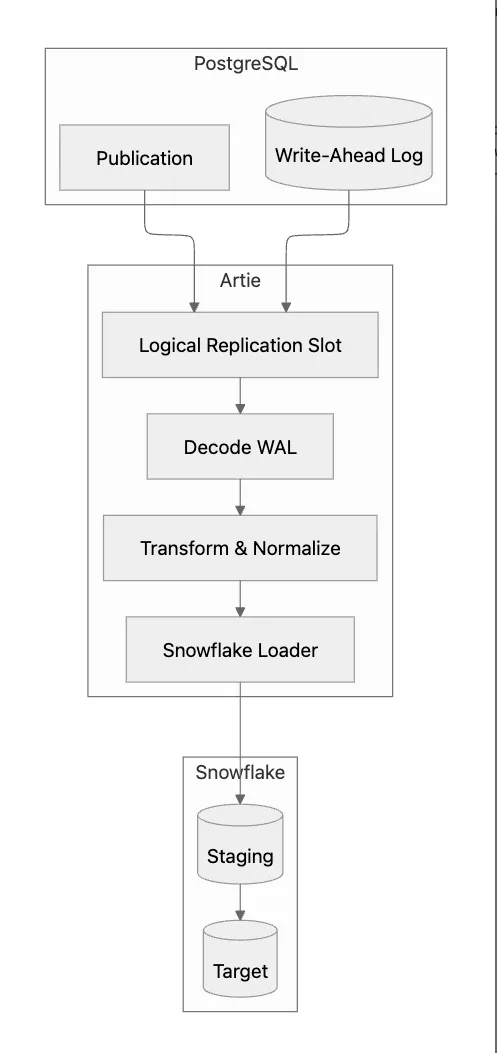
PostgreSQL WAL CDC Mechanism
Every time you commit a change in Postgres - an insert, update, or delete - it gets written to the WAL (write-ahead log) before anything else. That's what makes it a reliable source for CDC. Logical replication reads the WAL and decodes it into row-level events. Artie consumes these events through a replication slot, which acts like a bookmark - if Artie restarts, it picks up right where it left off without missing anything.
Publications define which tables to replicate. You create a publication and add tables:
Artie subscribes to this publication. It receives only changes for the published tables.
Read replica support. For Postgres 16+ on RDS, Artie can read WAL from a read replica instead of the primary. This eliminates any performance concern on your production database. Note: Aurora Postgres does not support logical replication from read replicas.
TOAST columns. Postgres stores large values - think big text fields or JSONB blobs - in separate TOAST tables. Artie handles TOAST automatically when decoding updates, no special config on your part. The one thing to watch: very large values (multi-MB JSONB documents) can slow down decoding. If you're storing giant blobs that you don't actually need in Snowflake, consider excluding those columns.
Partitioned tables. If you're using partitioned tables (Postgres 11+), you only need to add the parent table to your publication - Postgres automatically includes changes from all child partitions. Artie can either preserve the partition structure in Snowflake or flatten everything into a single table, depending on what you prefer. This works for all declarative partitioning strategies: LIST, RANGE, and HASH.
Replication identity. Tables without primary keys are a pain for logical replication. Postgres normally needs REPLICA IDENTITY FULL to decode updates and deletes on those tables, which means every column gets dumped into the WAL on every change. Artie handles most of these cases without that setting, but adding a primary key is still the best move for efficiency.
Snowflake Load Strategy
Artie writes to Snowflake in two steps: data lands in a staging table first, then gets MERGEd into the target. This gives you exactly-once semantics under normal operation - if a MERGE fails mid-flight (say Snowflake throws a transient error), Artie retries idempotently from the staging table, so you won't end up with duplicates. Your Postgres primary keys become the MERGE key on the Snowflake side. Composite keys work too.
| Postgres Type | Snowflake Type |
|---|---|
| SERIAL, BIGSERIAL | NUMBER |
| INTEGER, BIGINT | NUMBER |
| JSONB, JSON | VARIANT |
| TIMESTAMPTZ | TIMESTAMP_TZ |
| TIMESTAMP | TIMESTAMP_NTZ / TIMESTAMP_TZ |
| UUID | VARCHAR(36) |
| BYTEA | BINARY / String |
| BOOLEAN | BOOLEAN |
| VARCHAR, TEXT | VARCHAR / String |
| NUMERIC, DECIMAL | NUMBER / String |
| ARRAY | ARRAY or VARIANT |
| HSTORE | VARIANT |
| CIDR, INET | VARCHAR |
| MONEY | NUMBER / String |
| INTERVAL | VARCHAR or NUMBER (seconds) |
| Composite types | VARIANT |
| TSVECTOR, TSQUERY | VARCHAR |
| ENUM | VARCHAR |
| RANGE | VARCHAR or VARIANT |
| BOX, CIRCLE, POINT | VARCHAR or GEOGRAPHY |
| BYTEA (large) | VARCHAR / String |
Artie maps Postgres types to Snowflake equivalents automatically. Refer to the table above for the full mapping.
Things to keep in mind. Logical replication adds some overhead to your Postgres instance - mainly from the replication slot retaining WAL segments until they're consumed. For most databases this is negligible, but if yours has very high write throughput (hundreds of thousands of transactions per second), keep an eye on disk usage and make sure max_wal_senders is configured appropriately. Additionally, most DDL changes like ALTER TABLE ... ADD COLUMN are handled automatically, but some edge cases (like changing a column's type from FLOAT to INTEGER) may require manual intervention due to risk of precision loss. Artie flags these situations in the UI so you're never caught off guard.
Initial backfill. When you first connect a table, Artie uses DBLog to backfill existing data. It reads the current table state in chunks while CDC streams new changes in parallel - no table locks required. DBLog ensures no duplicate or missed rows when the backfill and CDC overlap, and chunk sizes are tuned automatically based on table size. To speed things up, large tables can also be backfilled in parallel using methods like CTID scanning. Note that backfills are always free on Artie.
Replication slot management. Artie immediately consumes events from the Postgres WAL, so the replication slot never accumulates backlog under normal operation. A Kafka buffer handles bursts of CDC events. If a connection error prevents Artie from writing data to the destination, the slot is still protected as we continue reading from the WAL and buffer in Kafka. From a monitoring perspective, Artie monitors slot growth and alerts before disk usage becomes a concern.
RDS and Aurora. Both RDS Postgres and Aurora Postgres support logical replication - you just need to set rds.logical_replication=1 in the parameter group and restart. Aurora Serverless v2 works too. Cloud SQL and Supabase let you enable it through their instance settings. No VPN or custom networking needed for standard setups. After flipping the switch, run SHOW wal_level; to confirm it returns logical before creating the publication.
Troubleshooting Common Issues
| Problem | Cause | Solution |
|---|---|---|
| Replication slot growth | Connection error prevents Artie from reading WAL; slot retains WAL until reconnected | Run SELECT slot_name, pg_wal_lsn_diff(pg_current_wal_lsn(), restart_lsn) AS lag_bytes FROM pg_replication_slots; to check lag. If growing, verify Artie's connection status first – a reconnection usually resolves it. If Artie is connected but lag persists, the Snowflake warehouse may be undersized or suspended. |
| Publication not created | Missing wal_level=logical or insufficient privileges | Set wal_level=logical in postgresql.conf; restart; grant REPLICATION to user |
| Permission denied on publication | User lacks REPLICATION or table SELECT | GRANT SELECT ON TABLE t TO artie_user; ensure user has REPLICATION privilege |
| Tables without primary key | Logical replication needs PK for update/delete | Add primary key or unique constraint; tables without keys replicate inserts only |
Get Started in Minutes
Step 1: Enable logical replication. Set wal_level=logical in postgresql.conf and restart. Create a replication user and publication:
Verify with SHOW wal_level; (should return logical) and SELECT * FROM pg_publication_tables WHERE pubname = 'artie_pub';. On RDS and Aurora, enable rds.logical_replication=1 in the parameter group before creating the publication. Restart may be required for parameter changes.
Step 2: Create Snowflake warehouse and schema. Run as ACCOUNTADMIN or equivalent:
Step 3: Connect PostgreSQL in Artie. Add your Postgres connection (host, port, database, user). Artie validates the publication and replication slot. Select the tables to replicate.
Step 4: Connect Snowflake and deploy. Add Snowflake credentials and target schema. Artie creates staging and target tables. Deploy the pipeline. Initial backfill runs automatically; then CDC streams changes in real time. Artie creates tables with the correct types.
Performance and Monitoring
Artie typically delivers 30–60 second end-to-end latency - from the moment a row is committed in Postgres to when it's merged into Snowflake. Under lighter load (a few hundred rows per minute), that drops to 15–30 seconds. For context, most batch ETL tools sync on hourly or daily schedules, so even the worst-case peak latency is orders of magnitude faster. High-volume tables may see 60–120 seconds during peaks. You can monitor replication lag directly in the Artie UI. If lag is high, it usually means Snowflake is throttling or the warehouse is suspended. On the Postgres side, check pg_replication_slots to compare restart_lsn against the current WAL position, and query pg_stat_replication for sender lag. Artie integrates with Datadog for centralized metrics - we recommend setting alerts when lag exceeds 5 minutes.
What to monitor. On the Postgres side, keep an eye on replication slot size using pg_replication_slots.pg_wal_lsn_diff(). If the slot is growing, it usually means Artie has lost access to the replication slot - not that reads can't keep up. On the Snowflake side, watch warehouse queue time - a suspended warehouse is the fastest way to introduce lag. Artie's UI shows per-table throughput and error rates, and if you're running Datadog, you can correlate everything in one place.
Expected throughput. A typical Artie pipeline handles thousands of rows per second. If you're backfilling a large table (100M+ rows), it runs in parallel alongside CDC with no table locks. One thing to watch: if you have high-churn tables, make sure your Snowflake warehouse is sized to match. An X-SMALL warehouse will start queuing under heavy MERGE activity, and that queuing shows up directly as latency. Artie batches rows per MERGE to balance throughput and freshness, and truncates staging tables after each successful merge to keep things clean.
Artie works with RDS Postgres, Aurora Postgres, Google Cloud SQL, Supabase, Neon, CrunchyData, and PlanetScale - basically, if it runs Postgres and supports logical replication, we can replicate it. No Debezium to configure, no Kafka cluster to babysit. Schema evolution and type mapping happen automatically. Start free to try it out.
FAQ
Do I need logical replication enabled for Postgres to Snowflake?
Yes. Artie uses logical replication to read changes from the WAL. Set wal_level=logical in Postgres. On RDS, Aurora, and Cloud SQL, enable this via parameter groups. Supabase supports it by default.
How does Artie handle schema changes in Postgres?
Artie detects new columns, type changes, and renames. Schema evolution propagates to Snowflake automatically. No manual DDL or pipeline restarts. New columns appear in target tables; deprecated columns can be dropped if you opt in; otherwise they are left as-is in the target table.
Does Artie work with RDS, Aurora, Cloud SQL, Supabase, Neon, CrunchyData, and PlanetScale?
Yes. Artie supports managed Postgres. Ensure logical replication is enabled. RDS and Aurora require rds.logical_replication=1. Cloud SQL, Supabase, Neon, CrunchyData, and PlanetScale support logical replication with appropriate configuration.
What is the performance impact on my Postgres database?
Artie reads from the WAL asynchronously. Impact is minimal to none compared to batch full-table scans. Artie continuously consumes from the WAL, so the replication slot does not grow under normal operation. Artie monitors slot growth and alerts proactively. For additional safety, ensure max_wal_senders and max_replication_slots are sized appropriately. Artie does not run queries against your tables for CDC; it only reads the WAL stream. Backfills use batched SELECT with configurable chunk size to limit load, and can be run against a read replica.