
Database Backfill Without Downtime: How Online Backfills Work

TL;DR: Database backfills usually mean your destination goes dark for hours - or days. One customer on AWS DMS had 2-3 days of unusable data every time they backfilled 20B+ rows of Postgres into Redshift. Artie runs online backfills - using a dual-write strategy and atomic swap - so the destination stays queryable the entire time. We also offer parallel backfill strategies that cut wall-clock time by 10-20x for large tables.
Database Backfills Are the Worst Part of CDC
A customer came to us replicating Postgres into Redshift. Over 20 billion rows spread across their transactional databases. They were using AWS DMS.
Every time they needed a database backfill - whether onboarding a new table, recovering from drift, or re-syncing after a replication slot drop - their destination data was unusable for 2-3 days. Not hours. Days. Downstream products that depended on that Redshift data broke. Teams couldn't query anything until the backfill finished and CDC caught up.
This wasn't a minor inconvenience. It was a production outage caused by the replication tool itself.
Their experience isn't unusual. With most replication tools, a database backfill creates pain on both sides of the pipeline.
Destination goes dark. While a backfill runs, the destination table returns incomplete or stale data. For large tables with hundreds of millions (or billions) of rows, this can mean hours or days of downtime for that table. Dashboards go blank. Reverse ETL pipelines feed stale data into your CRM. ML feature stores drift.
Source database takes a hit. Naive bulk reads compete with production queries for I/O, CPU, and memory - degrading user-facing latency while the backfill runs. And while the backfill is happening, WAL (Write-Ahead Log - the append-only log Postgres uses for crash recovery and replication) can build up on the source. If your CDC tool can't keep up, that WAL keeps growing - and an unmonitored replication slot can fill your disk or take your database down entirely.
Scheduling gymnastics. Since backfills are disruptive, you end up coordinating maintenance windows across teams. AWS even recommends scheduling DMS resyncs during "periods of minimal source database activity" - which is their way of acknowledging the problem.
At 20B+ rows, every inefficiency compounds. We built online backfills because this problem shouldn't exist.
How Artie Runs Backfills
Artie runs two parallel processes during every backfill:
- Backfill process (historical data) - Scans the full source table in batches and writes directly to the destination. This process can optionally read from a replica to keep load off your primary database.
- CDC process (live changes) - Reads from the transaction log immediately and queues all inserts, updates, and deletes into Kafka (our buffer) in real time.
Once the backfill completes, Artie applies the queued CDC changes in order, bringing the destination to a real-time streaming state. This architecture follows Netflix's DBLog pattern to prevent conflicts between the two processes and minimize database impact.
Backfill architecture: Artie Reader streams live changes through Kafka and Artie Transfer to the destination while a separate reader scans historical data, optionally from a read replica, through the same destination path.
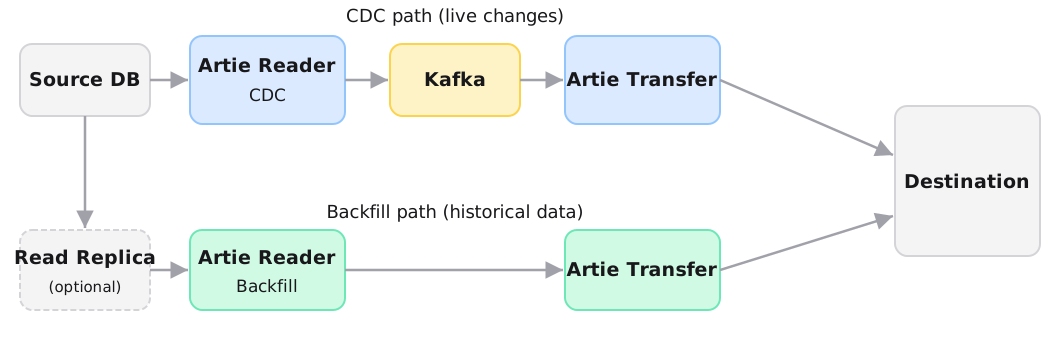
This design gives us two properties that most replication tools lack.
No WAL buildup. Most systems backfill first, then stream - so changes pile up in the source database's WAL and must be drained afterward, often causing replication lag spikes. Because Artie runs backfill and CDC in parallel, the WAL is continuously consumed and stored in Kafka.
No repeated merges. Backfill rows are appended directly to the destination table. The only merge is a single final dedupe pass once the backfill completes, rather than a merge on every batch. For destinations like Snowflake or Redshift where MERGE is expensive, this is a meaningful cost and performance win.
By default, Artie backfills 10 tables in parallel per pipeline, processed in FIFO order. In our benchmarks, parallel backfills loaded 100 million rows into Snowflake in 9 minutes and 36 seconds - down from 67 minutes without parallelism. That concurrency limit is tunable for deployments with high table counts.
Read replica offloading. Artie can run the backfill reader against a read replica instead of the primary database. This keeps backfill I/O completely off the primary, so production workloads are unaffected even during large initial loads. For MongoDB, this is handled natively through the connection string - adding readPreference=secondaryPreferred routes all backfill reads to a secondary replica while CDC continues reading the change stream from the primary.
Online Backfills - No Downtime for Your Destination
With most replication tools, running a backfill (or "resync") means your destination table is effectively unusable until the operation finishes. Queries return stale or incomplete data, dashboards go dark, and downstream jobs fail.
Artie solves this with online backfills - a dual-write strategy that keeps your destination table fully queryable throughout the entire backfill. The approach is inspired by gh-ost, GitHub's tool for online, non-blocking schema changes, which popularized the idea of backfilling a separate "ghost" table and atomically swapping it in when ready.
Take the Postgres-to-Redshift customer. 20B+ rows across their transactional databases. With DMS, every backfill meant 2-3 days of unusable data and broken downstream products. Here's what happens with online backfills instead.
Step 1: Dual write. Artie writes incoming CDC data to both the existing (live) table and a new staging table simultaneously. The live table continues to serve queries as normal. Their product keeps working.
Step 2: Backfill into staging. The backfill process scans the source and loads historical data into the staging table. CDC changes are also applied to the staging table in parallel, so it converges toward a complete, up-to-date copy.
Step 3: Catch-up. Once the backfill finishes and all queued CDC changes have been drained, the staging table is fully caught up with the source.
Step 4: Atomic swap. Artie renames the staging table to the original table name and archives the old table. From the perspective of any downstream consumer, the table name never changed - it simply now contains a complete, freshly backfilled dataset.
Online backfill process: CDC writes to both the live and staging tables while historical data loads into staging. Once staging converges with the source, an atomic swap makes it live. Queries continue to hit the live table throughout.
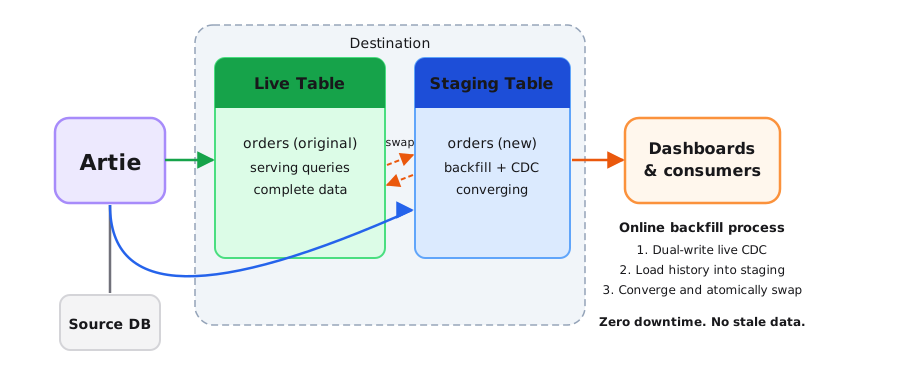
The result: your destination table is usable at every point during the backfill. There is no window where queries return incomplete data. No downtime for dashboards, reverse ETL, or downstream jobs.
Before - 2-3 days of broken products. Now - zero downtime. The old table serves queries the entire time, and the swap happens in seconds.
Making Database Backfills Fast
Beyond the architecture above, Artie supports three backfill strategies that can be selected per table. They trade off prerequisites for speed.
Normal (default). A sequential scan in batches using a single reader. Works on any source, no assumptions about primary key type or physical layout. Appropriate for small-to-medium tables where wall-clock time isn't a concern.
Interval (parallel PK-range chunking). For tables with integer primary keys, Artie chunks the table into primary-key ranges and backfills them concurrently. This dramatically reduces wall-clock time for large initial loads. Available for both MySQL and Postgres. For Postgres specifically, Artie's Parallel Segmented Backfill slices tables into logical row segments based on integer primary keys and parallelizes across those chunks - resilient to row movement caused by updates and vacuuming, and avoids statement_timeout failures in large or busy tables.
CTID-based (Postgres, physical-location sharding). For very large Postgres tables - think 10 billion rows and up - Artie offers CTID-based scanning that parallelizes the backfill by physical row location. CTID scanning shards the table and processes shards concurrently, resulting in up to 10-20x faster backfills. Built-in controls include configurable shard sizes, max parallelism, and CPU limits to avoid noisy-neighbor problems. One caveat: because CTID scanning depends on physical row locations, it's sensitive to vacuum operations (more on this in the trade-offs below). If that's a concern, the interval strategy offers similar parallelism with stronger guarantees in dynamic environments.
| Strategy | Best for | Requirements |
|---|---|---|
| Normal | Small-to-medium tables; any source type | None |
| Interval | Large tables with integer primary keys | Integer PK on MySQL or Postgres |
| CTID-based | Very large Postgres tables (10B+ rows) | Postgres; read replica strongly recommended |
A few things worth knowing about trade-offs:
- CTID scanning calculates shard boundaries before starting, which can take a few minutes for very large tables. CTID scanning relies on physical row locations, so if a Postgres vacuum runs mid-backfill, it can move rows and invalidate shard boundaries - forcing a restart. In practice, you'll want to disable autovacuum on the target table for the duration of the backfill. This is also why we recommend running CTID backfills against a read replica.
- Online backfills temporarily use roughly 2x the destination storage, since both the live table and staging table exist side by side until the swap completes. For most warehouses this isn't a concern, but worth flagging if you're tight on storage.
- The interval strategy requires integer primary keys. If your table uses UUIDs or composite keys, the normal strategy is your fallback.
You can also scope a backfill to a subset of rows using a WHERE clause - for example, targeting a specific tenant, a date range, or rows matching a particular status. This reduces both the blast radius and duration when only part of the table needs refreshing.
How This Stacks Up Against AWS DMS
The customer we mentioned earlier was on DMS. Here's what their backfill experience looked like compared to what it looks like now.
| Capability | Artie | AWS DMS |
|---|---|---|
| Table usable during backfill | Yes – live table serves queries throughout | No – table is stale or incomplete until reload finishes and CDC catches up |
| CDC during resync | CDC runs continuously in parallel; no pause | CDC replication pauses during resync window, causing WAL spikes |
| Scheduling required | No – backfills can run any time without impact | AWS recommends scheduling during "periods of minimal source database activity" |
| Swap mechanism | Atomic rename – consumers see no interruption | No equivalent – table transitions through loading states visible to consumers |
| Source DB impact | Backfill can run against a read replica; tunable parallelism and CPU limits | Full load runs against the source; limited tunability |
We recently benchmarked Artie vs DMS head-to-head on Postgres to Snowflake under sustained production-level writes. The highlights: 68x faster CDC replication, 23x faster history mode, and 16x less WAL retention on the source database. Read the full benchmark results here.
If you're evaluating CDC tools and backfill performance matters, talk to us.
Database backfills don't have to be painful. They don't have to take your destination offline for days, break downstream products, or require carefully scheduled maintenance windows. With online backfills, your destination stays queryable throughout. With parallel strategies like PK-range chunking and CTID scanning, wall-clock time drops by an order of magnitude for large tables.


