
It seems like all of Silicon Valley is talking about AI solving Millennium Prize math problems and reaching AGI. Meanwhile, infrastructure problems still suck, and we still need engineers who understand networking and how to run a good Kafka cluster.
The debate between Confluent and Redpanda is a debate from another era, and who cares? They are both good and they both implement the Kafka APIs.
Kafka is still the industry-standard event bus. Most large teams prefer Kafka and its ecosystem, while others make do with tools like Amazon SQS or Google Pub/Sub.
We believe launching Kafka in the AI era should mean two things:
- It should have a DevOps engineer baked into the product, so you don't have to be on call.
- It should cost close to what it would cost you to run it yourself.
Usually you pick one, because everything is a trade-off. That used to be true. We don't think it has to be anymore.
How We Ended Up Running Our Own Kafka
When I started Artie, I assumed I would use Confluent, because our data planes need a cloud-agnostic Kafka. The deal-breaker came quickly: I couldn't change broker settings without buying an enterprise tier.
Redpanda required us to run its agent inside each of our data plane clusters. That would have complicated every bring-your-own-cloud deployment we run for customers.
So we went with Amazon MSK, and MSK was good to us for a long time. But then the cracks started to show.
Storage could only grow. MSK lets you add disk to a broker but never take it back, and after every increase the cluster sits in a cool-down of at least 6 hours, sometimes more than 24, before you can scale it again (AWS docs). So we overprovisioned every cluster, and when a guess was still wrong, we had to cut retention (delete data) or move topics to another cluster to get through the wait.
Configuration changes were slow. Changes that should take a few minutes took over an hour on MSK.
Metrics cost extra. Per-broker metrics meant paying for a higher monitoring tier or running our own JMX scraper.
Adding brokers was manual. MSK doesn't move existing partitions onto brokers you add. AWS's answer is kafka-reassign-partitions.sh, with no more than 10 partitions per call (AWS docs). So I wrote my own rebalancer job, with throttling and pauses between batches so production traffic didn't notice. Here's one of our clusters after we added 3 brokers, at three points in the hour that followed:
Partitions per broker after we added 3 brokers
Our Amazon MSK cluster at 13:05: 617 partitions between the busiest and quietest broker
The dashed line is an even split, 437 per broker. Partition replicas per broker from our Datadog dashboard; the total grows because new topics were created during the hour.
| Time | Broker 1 | Broker 2 | Broker 3 | Broker 4 (added) | Broker 5 (added) | Broker 6 (added) |
|---|---|---|---|---|---|---|
| 13:05 | 745 | 732 | 736 | 137 | 141 | 128 |
| 13:21 | 821 | 815 | 809 | 206 | 200 | 194 |
| 14:03 | 727 | 707 | 717 | 427 | 423 | 418 |
An hour in, the added brokers still held about 300 fewer partitions than the originals. We worked through every edge case like this one, but what settled the decision to move off MSK was a major outage caused by IAM authentication.
The Night IAM Auth Took Down Our Brokers
On the afternoon of May 9, 2024, I added 3 brokers to one of our Kafka clusters, then moved a customer workload onto the newly scaled-up cluster.
At 9:24 pm, broker 2's CPU spiked, followed by a flurry of consumers stuck in "Rebalance in progress" loops.
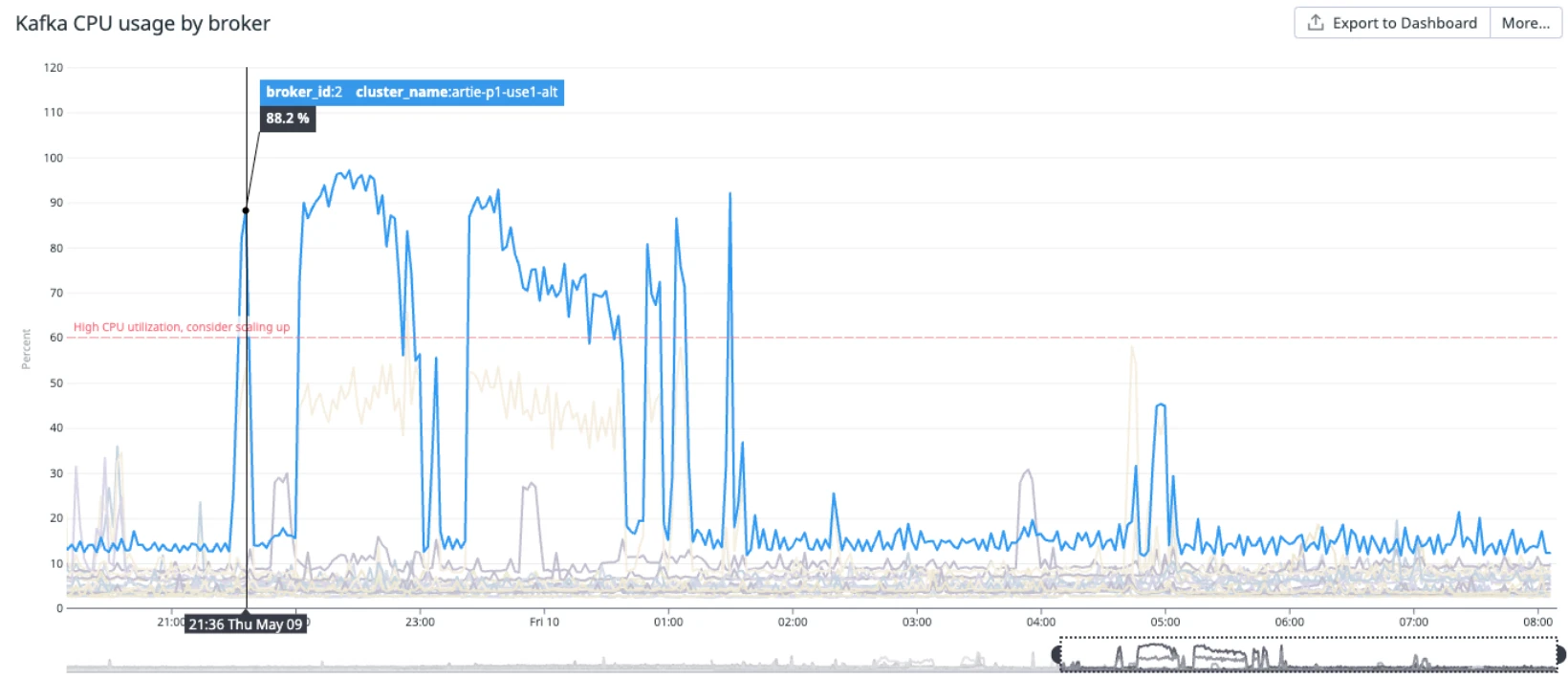
It was hard to debug:
- The error message didn't suggest much. It looked transient, but it wasn't.
- We tried spreading the load by shuffling the bootstrap servers in our clients' Kafka connection strings, but that didn't work.
- Turning off 40 Kubernetes consumer deployments helped, but as soon as I turned a few of them back on, the rebalance loop started again.
MSK's IAM authentication agent was eating the broker's CPU on every new client connection. IAM auth is CPU-intensive for the broker, so when enough clients reconnect at once, the broker spends its CPU authenticating them instead of serving data, which makes more clients time out and reconnect.
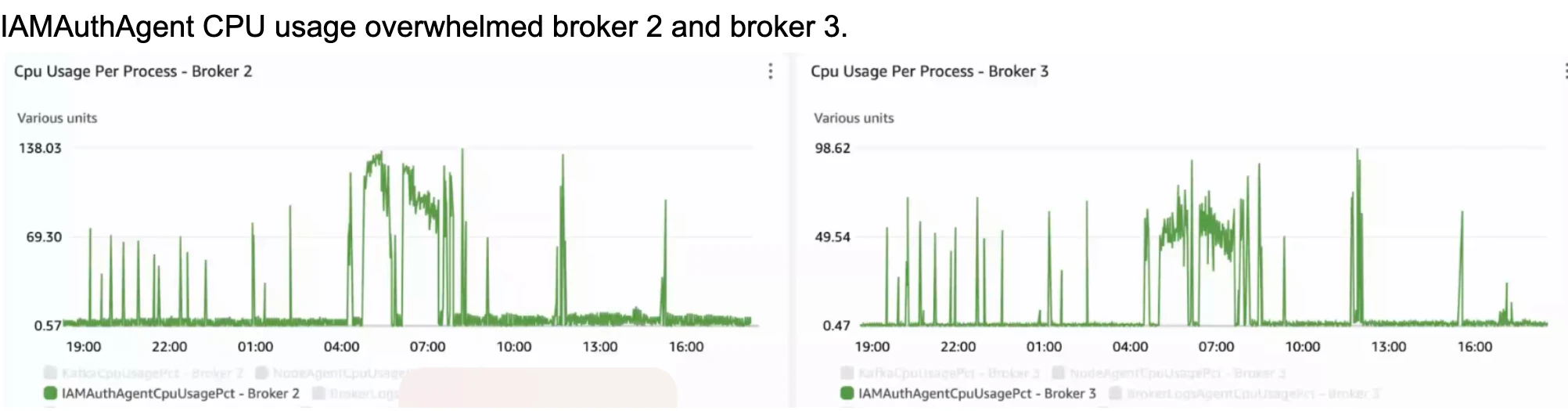
SASL/SCRAM pushes most of that work to the client, and we should have used it. The expensive part of SCRAM is hashing the password with its salt over a set number of iterations, and the client does all of it. The broker only does a small amount of hashing to check the client's proof. Switch to everyone reconnecting at once to see why that mattered:
Where the expensive part of auth runs
Each new client connection, before it can read or write
| Method | On the clients | On the broker |
|---|---|---|
| IAMMSK, what we ran | Signs the request | Checks the signature and IAM policy |
| SASL/SCRAMWhat we moved to | Hashes the password with its salt, thousands of times | A few quick hashes and a compare |
Large squares are the expensive work, small ones the cheap work. A picture of where the work runs, not a measurement.
That night we added jitter on reconnects as a fix. Later we moved to SASL/SCRAM. Over the next year, as we got good at running Kafka, we moved all our workloads onto our own Kafka on Kubernetes with Strimzi, a CNCF project we'd followed for a while.
What We Built
Brokers that heal in place. If a broker dies, it comes back with the same disk, through a Kubernetes PersistentVolumeClaim, and catches up on its own. If the node is gone, a new one starts in the same availability zone and attaches the same disk. We use the recommended high-availability settings: every partition has 3 copies (replication factor 3) and a write needs 2 of them (min.insync.replicas = 2), so if one broker is down, the cluster keeps going.
When a broker fails
3 partitions, 3 copies each. Filled chips lead their partition.
Every partition has 3 copies, one on each broker. A write counts once 2 of them have it.
Automated rebalancing through Cruise Control. When we first wrote our own rebalancer in 2024, it was naive. It flagged storage-heavy topics, moved partitions in chunks, and slept between iterations so production wasn't affected.
We kept adding logic, like skipping hot partitions, replication throttling, and leadership-aware placement. Eventually it mirrored LinkedIn's Cruise Control, so we switched to the real thing.
Storage that scales with you. We tackled storage in two ways:
- Storage autoscaling. We took inspiration from RDS storage autoscaling: disks grow before they fill, up to a limit you set, so a traffic spike doesn't force you to cut retention.
- Tiered storage. At the cluster and topic level, you choose how much recent data lives on broker disks and how much is offloaded to S3 (KIP-405). Consumers read both the same way. That way the disk doesn't keep growing with your retention, and history for replays sits in S3 instead of EBS.
Your agent can run it too. Everything you can do in the dashboard is in our public API, with an OpenAPI spec. Our MCP server is built on that spec, so your agent can do anything you can: create topics, change broker configs, start a rebalance and check on it. If letting an agent near production makes you nervous (it should), turn on read-only mode and let it look without touching anything. Terraform support for clusters and topics is next.
Every broker setting is yours. We ship sensible defaults, and you can change cluster configurations yourself. No enterprise flag blocks you, and changes apply in minutes instead of an hour.
We carry the pager. On MSK, you still plan storage, schedule upgrades, rebalance partitions, and answer the alarms. On Artie, our engineers carry the pager. The platform replaces failed brokers, rebalances partitions, grows disks, and rolls out upgrades one broker at a time. Every change we make shows up in your activity log, and broker metrics stream to your Datadog.
We did the same thing with Artie CDC, where we turned the on-call work our customers used to do for data pipelines into software. Now we're doing it for Kafka.
Security. You can deploy in Artie's cloud or in your own cloud environment. Clients connect over TLS with SASL/SCRAM, and only IP addresses on your allowlist can get in. AWS PrivateLink, GCP, and Azure are on our roadmap.
What Kafka Should Cost
We believe managed infrastructure should be priced close to its actual cost, with a slim margin on top. Charging a big markup made sense when running Kafka well meant paying a big ops team. It doesn't anymore. We're an AI-native company that already built all of this for ourselves, and we pass the savings on to our customers.
Our Kafka pricing has two parts:
- AWS's cost, at on-demand prices with nothing added. That covers the broker instances, their gp3 disks, S3 for tiered storage, the load balancer and its public IP address, and data transfer.
- Artie's fee: 25% of the broker instance cost. We don't mark up storage or data transfer.
You see that breakdown in the dashboard before you create anything:
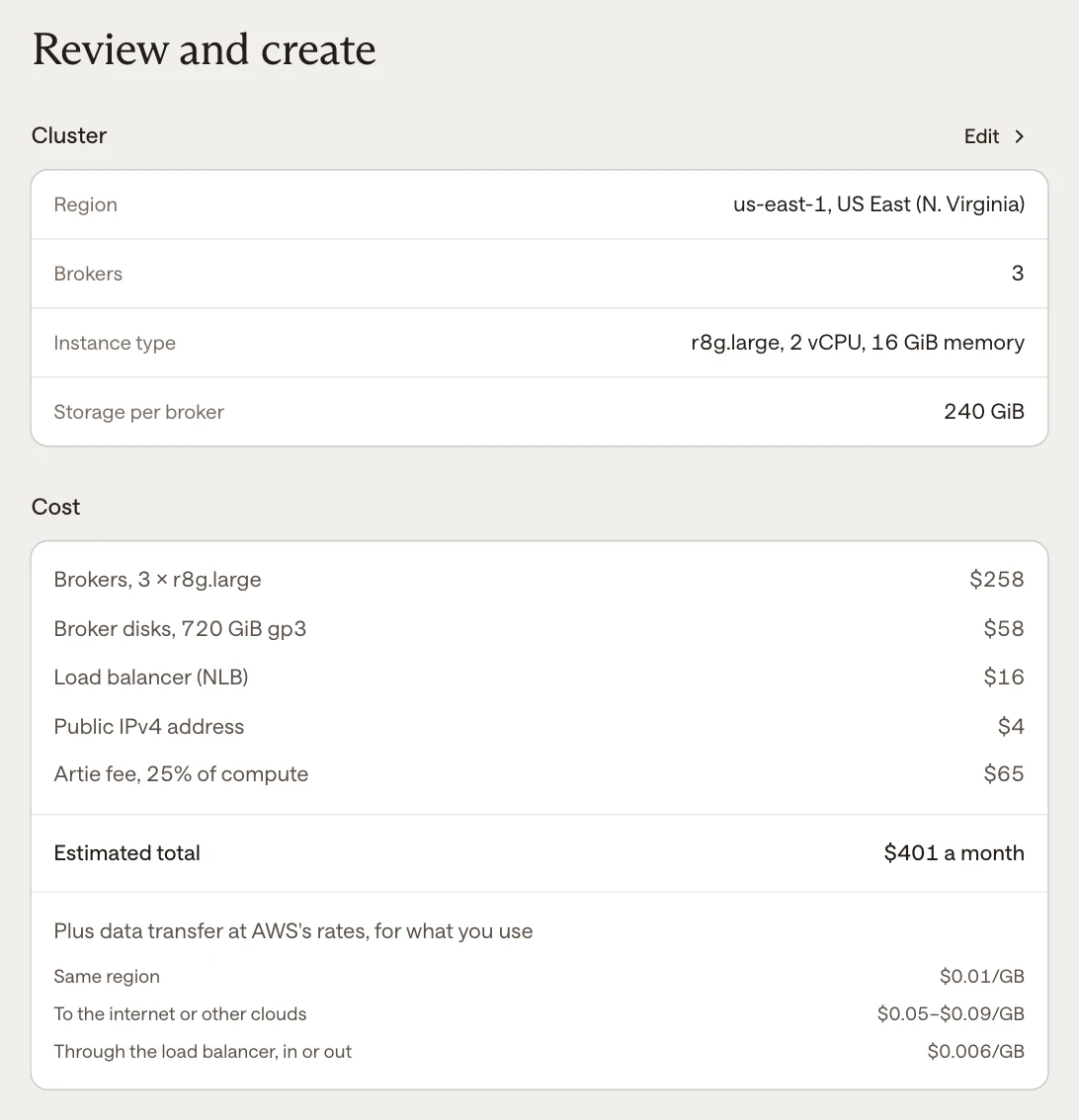
Data transfer is where managed Kafka bills balloon. On Artie, consumer reads in the same region cost AWS's $0.01 per GB. Confluent and Redpanda charge $0.035 to $0.05 for every GB in and out.
Here's the same workload on Artie and on Amazon MSK, at today's prices. Pick a size:
59% less than Amazon MSK
Monthly cost for 5 MB/s in, 2 TB retained, on 6 r8g.large brokers
AWS prices for us-east-1 as of November 2, 2026; Amazon MSK prices from AWS's price list of October 14, 2026. Both read everything written once, in the same region. Artie runs in one availability zone; Amazon MSK runs the same number of brokers with the same memory across three zones, with its cross-zone client traffic. Source: Amazon MSK.
To keep the comparison fair: launch clusters run in a single availability zone, while the MSK price runs the same brokers across three zones and includes cross-zone client traffic. One zone is also why there's no cross-zone replication charge on your Artie bill. Each message is still stored on 3 brokers, so losing a broker doesn't stop producers, but a full zone outage takes the cluster down until the zone recovers. Multi-AZ is on our roadmap.
To price your own cluster, use the calculator on artie.com/kafka.
Coming from another Kafka? Schedule a call and our engineering team will plan the migration with you. We use MirrorMaker 2 to copy your topics over, then help you move your producers and consumers. A self-serve migration tool in the dashboard is in the works.
Artie Managed Kafka is live today. Create a cluster and you'll see the price before anything is created, or start with the docs.
Kafka in 2026
Most teams we talk to don't hate Kafka, they hate running it. It's complicated and it pages you. Brokers and storage need scaling, data transfer needs watching, and if you misconfigure it, you can get hit with a massive bill.
We think it should be boring and cheap. We're turning the work that used to need an ops team into software: replacing brokers, rebalancing partitions, growing disks, and catching problems before they page anyone. Every task we automate is one less reason for you to be on call, and one less line on your bill.
Cheap Kafka or good Kafka? We don't think you have to pick anymore. Come try to break it.
