
How Apache Iceberg Works: Catalogs, Manifests, and Snapshots Explained

How Apache Iceberg Actually Works
Data lakes were supposed to make analytics simple.
Put Parquet files in S3. Point Spark or Trino at them. Run queries.
Done.
Except it didn’t work like that. Most “tables” in data lakes are really just folders full of files:
That works for a while. But once that directory turns into thousands of files, spread across partitions, written by multiple jobs, it stops behaving like a table and starts behaving like a pile of objects in storage.
Take a table like analytics.orders.
Every time a customer places an order, a row lands there. Over time, that table might grow to billions of rows stored across thousands of Parquet files. That’s where the problems start. Schema changes can break reads. Concurrent writes can corrupt table state. Query engines end up scanning far more files than they should. And if bad data lands, rolling it back is painful.
Apache Iceberg exists to fix that. Instead of treating a table as a directory of files, Iceberg adds a metadata layer that tracks schemas, snapshots, partitions, and file statistics. The result is a system where data in object storage behaves like a real database table.
To understand why Iceberg works so well, you have to look at how it’s structured.
Iceberg Isn’t a File Format
First, let’s clear something up: Iceberg isn’t a file format. Parquet, ORC, and Avro are file formats. They define how data is stored inside a file. Iceberg is a table format.
A table format defines things like:
- which files belong to a table
- how schemas evolve
- how writes are committed
- how engines discover the latest table state
Without a table format, query engines are guessing. They infer partitions from directory names. They infer schemas from files. They assume no one else is writing at the same time. Iceberg replaces that guesswork with structured metadata.
Why Iceberg Replaced Hive Tables
Before Iceberg, most data lakes used Hive-style tables. A Hive table is essentially just a directory structure that encodes partitions in folder names:
Query engines discover partitions by scanning directories and inferring structure from the file layout. This approach worked when datasets were small. But as tables grew to thousands or millions of files, the limitations became obvious.
Some common problems:
- Partition discovery is slow. Engines often need to list large directory trees before planning a query.
- Schema changes are fragile. Different files can contain different schemas, which leads to inconsistent reads.
- Concurrent writes are unsafe. Multiple jobs writing files at the same time can corrupt the table state.
Iceberg solves these problems by moving table state into a metadata layer instead of relying on directory structure. Instead of discovering partitions by scanning object storage, query engines read a metadata snapshot that explicitly lists every file in the table.
That shift - from directory-driven tables to metadata-driven tables - is what enables Iceberg’s features like:
- atomic commits
- schema evolution
- time travel
- efficient query planning
Once you understand that change, the rest of Iceberg’s architecture starts to make sense.
The Three Layers of an Iceberg Table
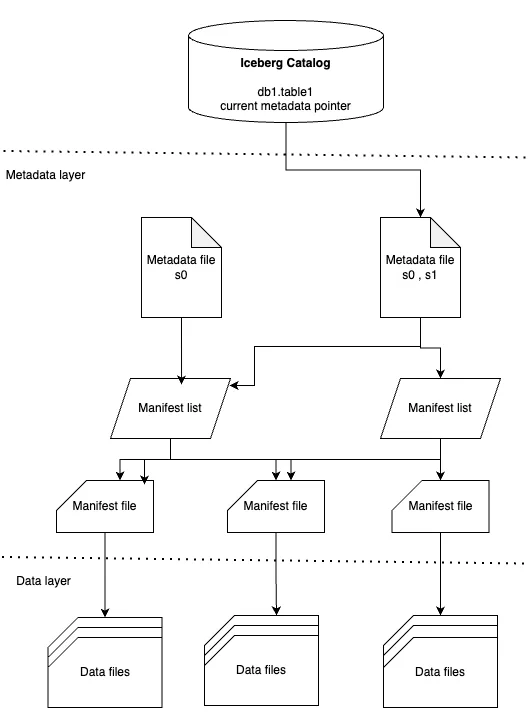
Iceberg tables are built from three layers:
- Catalog
- Metadata
- Data files
Think of them as a stack.
Each layer solves a different problem.
Catalog
The catalog is where query engines start. Instead of storing table definitions inside the engine itself, Iceberg uses a catalog to store a pointer to the latest metadata file for a table.
Common catalogs include:
- AWS Glue
- Hive Metastore
- Databricks Unity Catalog
- Snowflake Polaris
When a query engine wants to read a table, it asks the catalog:
Where is the current metadata file?
Everything else flows from there.
Metadata
The metadata layer is the real magic.
It tracks everything about the table:
- schema
- partition specs
- snapshot history
- file inventory
Iceberg organizes this metadata into three types of files:
- metadata files
- manifest lists
- manifest files
Together they describe exactly which files belong to the table.
Metadata Files
Metadata files are JSON documents describing the table.
They contain:
- schema definitions
- partition specs
- snapshot history
- table properties
Every time the table changes, Iceberg writes a new metadata file. Older versions stay around, which enables time travel.
Manifest Lists
Each snapshot points to a manifest list. A manifest list is essentially the table of contents for that snapshot.
This allows Iceberg to isolate reads from writes. Readers see one consistent snapshot of the table.
Manifest Files
Manifest files track the actual data files.
They include:
- file paths
- row counts
- partition values
- column statistics like min/max values
Those statistics are what make Iceberg fast. Suppose our analytics.orders table is partitioned by date.
A manifest might contain metadata like:
If a query asks for:
Iceberg can skip files whose min/max date doesn’t match the filter. Instead of scanning thousands of files, it reads only the relevant ones.
What Happens When You Write Data
When new data arrives for our analytics.orders table, Iceberg follows a predictable write pattern:
- New data files are written
- New manifest files describing them are created
- A manifest list is generated
- A new metadata file is written
- The catalog pointer is atomically updated
The key step is the last one. Updating the catalog pointer is atomic. Readers either see the old version of the table or the new one - never a partial write. That’s how Iceberg provides ACID guarantees even though the underlying storage is just object storage.
Why This Matters for Data Pipelines
If you’re building pipelines into Iceberg, you’re not just writing Parquet files.
You also have to manage:
- snapshot commits
- manifest generation
- metadata updates
- compute for compactions
- catalog integration
That infrastructure is easy to underestimate.
The tricky part isn’t writing Parquet files. Most systems can do that.
The hard part is coordinating metadata commits safely while data is continuously arriving. Iceberg tables rely on atomic snapshot updates, which means writers have to carefully manage manifests, metadata files, and catalog pointers so that concurrent writes don’t corrupt the table.
At scale, you also need background jobs to compact small files, clean up old snapshots, and keep metadata from growing unbounded.
Which brings us to where Artie comes in.
Supporting Iceberg in Production
At Artie we support Apache Iceberg as an OLAP destination alongside warehouses like Snowflake, Databricks, and Redshift.
Artie is a fully managed real-time streaming platform that moves data into warehouses, lakes, and operational systems in real time. Instead of building complex streaming infrastructure, teams use Artie to continuously replicate production data with sub-minute latency and strong consistency, powering analytics, operational systems, and AI applications.
Our goal was to make Iceberg feel like a managed warehouse: you stream data into Iceberg tables and query it immediately from engines like Snowflake or Databricks. Supporting Iceberg required building a compute layer responsible for managing the table lifecycle.
The tricky part isn’t writing Parquet files. Most systems can do that.
The hard part is coordinating metadata commits safely while data is continuously arriving. Iceberg tables rely on atomic snapshot updates, which means writers must carefully manage manifests, metadata files, and catalog pointers so that concurrent writes don’t corrupt the table.
At scale, you also need background jobs to compact small files, clean up old snapshots, and prevent metadata from growing unbounded. To handle this safely, Artie runs ingestion through a dedicated compute layer.
The Compute Layer
The system runs Spark SQL jobs through Apache Livy, which allows Spark workloads to be submitted and managed programmatically.
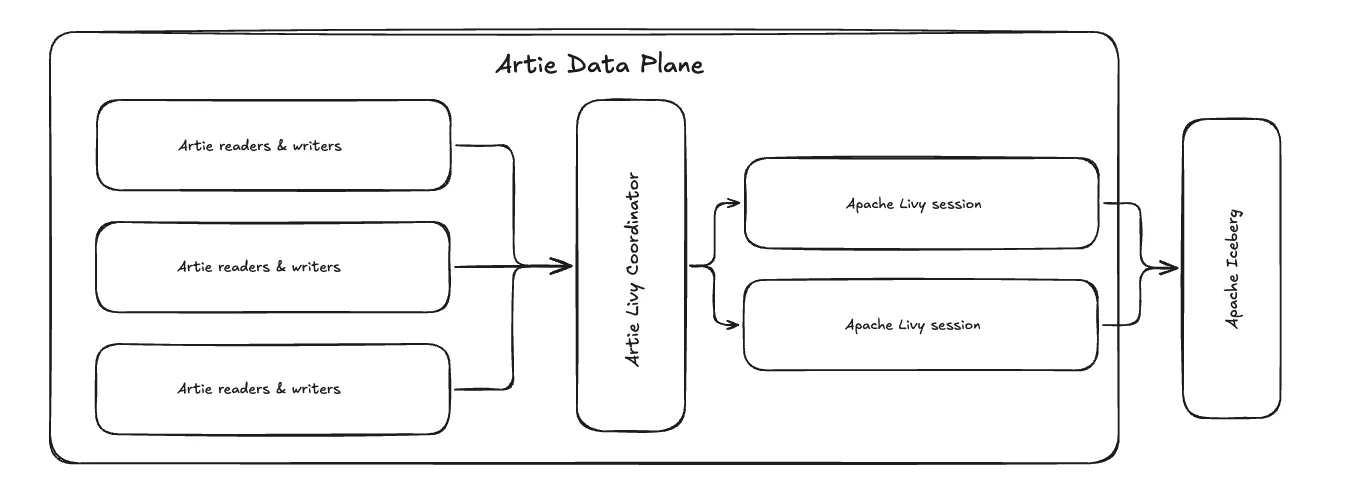
This compute layer is responsible for:
- writing data files
- generating manifest files
- committing metadata updates
- running background maintenance tasks such as compaction
Instead of treating these jobs as simple batch workloads, the system treats them more like warehouse queries – continuously scheduled, monitored, and managed.
Observability and Workload Management
Running Iceberg ingestion reliably requires more than just submitting Spark jobs.
Because these workloads are constantly writing data and committing metadata, the compute layer needs strong observability and workload controls.
For example, the system tracks metrics such as:
- query execution time
- queue time when clusters are overloaded
- Iceberg commit latency
- resource utilization across compute sessions
These metrics allow the system to detect when workloads are backing up and automatically scale or rebalance jobs across compute resources.
We also implement safeguards similar to those found in managed warehouses. For example, the platform supports features like aborting detached queries, which prevents Spark jobs from running indefinitely if the client that initiated them disconnects.
Together, these controls ensure that ingestion workloads remain predictable even as tables grow to billions of rows.
Scaling the Cluster
Because ingestion workloads can fluctuate significantly, the compute cluster automatically scales based on CPU and memory usage. A coordinator distributes jobs across Livy sessions so that ingestion tasks don’t block other operations. This prevents large writes, compactions, or backfills from starving other workloads in the system.
In practice, this turns what would normally be a complex Spark deployment into something that behaves much more like a managed warehouse.
Closing
Iceberg is part of a broader shift in data infrastructure: treating object storage as the foundation of modern databases. Apache Iceberg solves a deceptively simple problem: how to turn a collection of files into something that behaves like a database table.
It does that with metadata. Catalogs track the current table state. Metadata files define immutable snapshots. Manifest files describe which data files belong to each snapshot, along with the stats query engines use to avoid unnecessary scans.
Once you understand that, Iceberg’s features – time travel, schema evolution, and atomic commits – make a lot more sense.
And if you’re writing into Iceberg, that architecture is the whole game. You’re not just landing Parquet files. You’re managing snapshots, manifests, commits, and cleanup in a way that keeps the table fast and correct as new data keeps arriving.


